Skip to content

Falkir is just starting out: the content of this site is for information only and is not a binding offer. See services →

Kutu

Record the session. Walk away with the transcript, the summary and the map.

Listen. Kutu takes the notes.

Kutu records a class, a meeting, a talk or an interview and turns it into material you can review: who said what, the key points in a summary and the ideas in a map. All of it happens on your device.

Out in November 2026

With one year free and everything included.

  • Who said what
  • Material to review
  • Every idea, with its minute
Kutu on Mac: the transcript by speaker next to the marked moments and the key points of the session
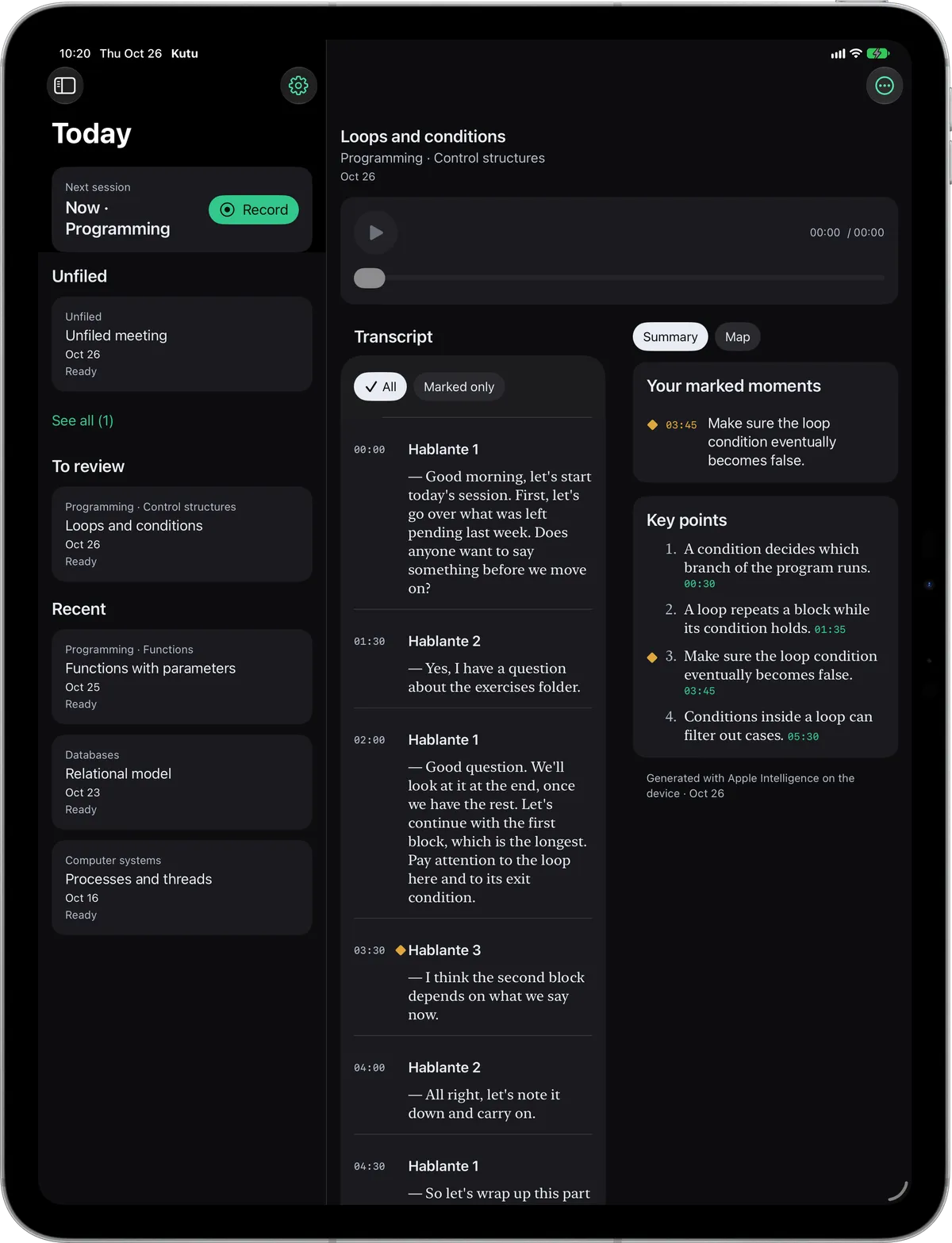
Kutu on iPad: the Today screen on the left and, on the right, the session “Loops and conditions” with its transcript by speaker and its key points
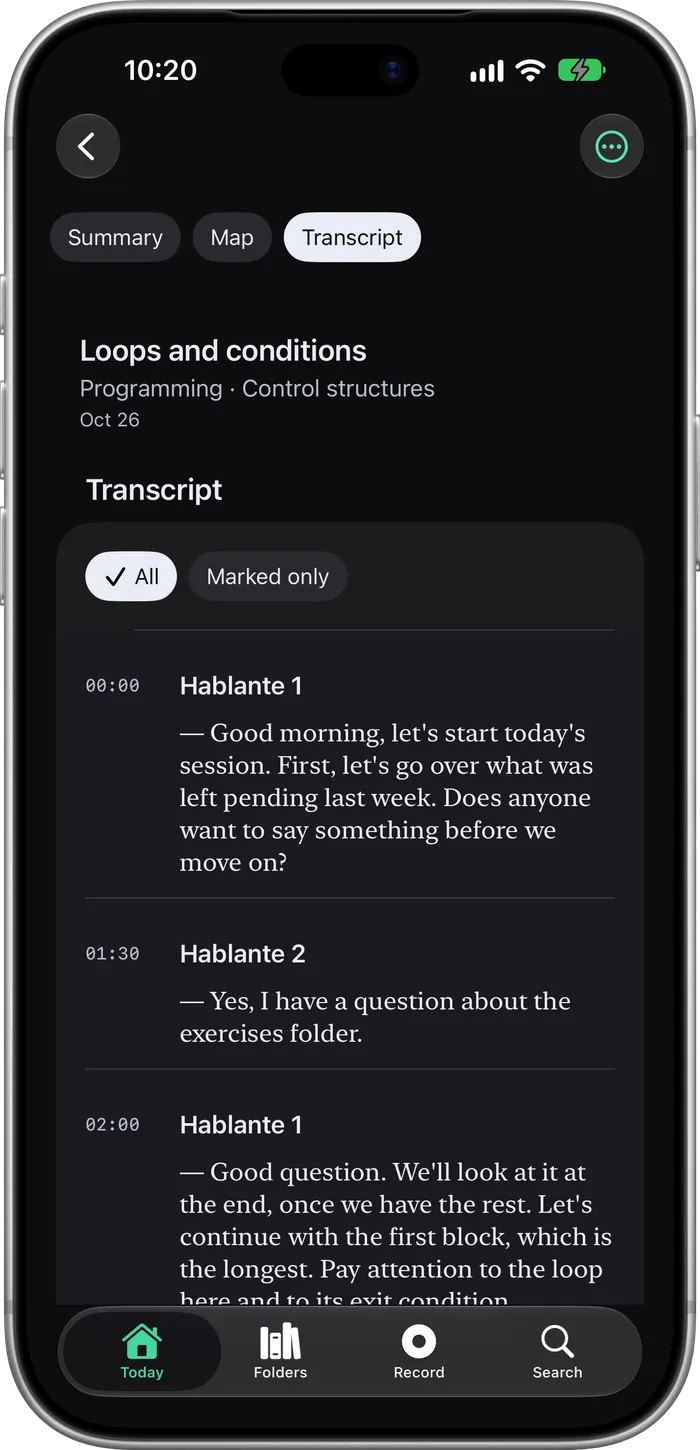
Kutu on iPhone: the transcript of the session “Loops and conditions”, with every turn split by speaker and its minute
  • Who said what

    A transcript with every voice separated and the minute in front, not a wall of text to decipher.

  • Material to review

    A summary, a map of ideas and notes by topic. The session doesn’t end up as an hour-long recording nobody plays again.

  • Every idea, with its minute

    From the summary and the map you jump back to the exact moment in the recording to hear it again, in context.

  • On your device, not in someone else’s cloud

    It is recorded, transcribed and summarised on your iPhone, iPad or Mac. Nobody else listens to your lectures or your meetings.

  • Record without babysitting it

    With the microphone on your iPhone, iPad or Mac, or with your AirPods, even with the screen locked. Kutu tells you whether the voice level is good and how much noise there is, and if something interrupts the recording, Kutu recovers it.

  • Transcripts that know who is speaking

    Kutu transcribes the session on the device itself and tells each speaker apart, with the minute in front of every turn. Mark a moment while you record and find it later with one tap on “Marked only”.

  • A summary and a map for every session

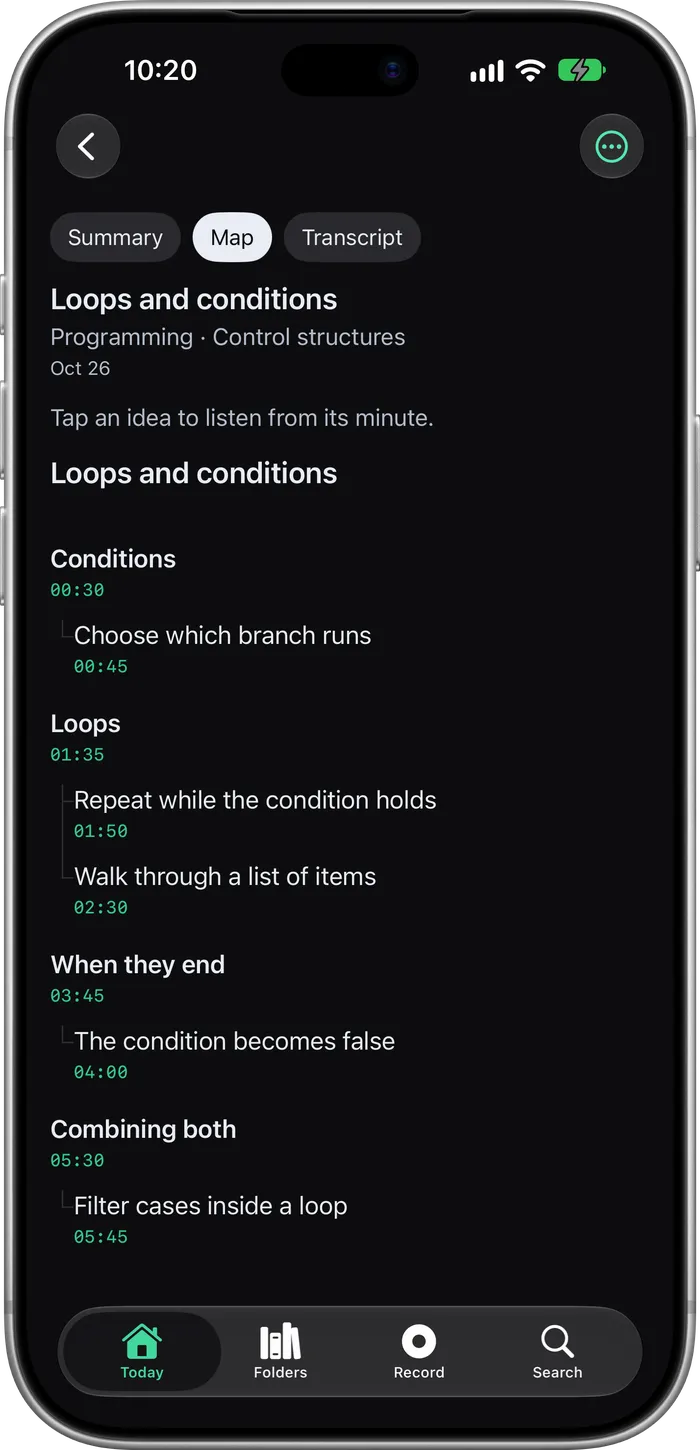
    Every session comes with its key points and a map of its main ideas, each with its minute. Tap an idea and the recording plays from there, to review before an exam or your next meeting.

  • Notes that write themselves

    Group sessions into folders and topics. Kutu brings together what was said about a topic across all its sessions into notes that update every time you record another one.

  • Today at a glance

    Give each folder its schedule and Kutu suggests the right one when you tap Record. Today shows what is on now, what is processing, what still needs filing and what is worth reviewing.

  • Find any word

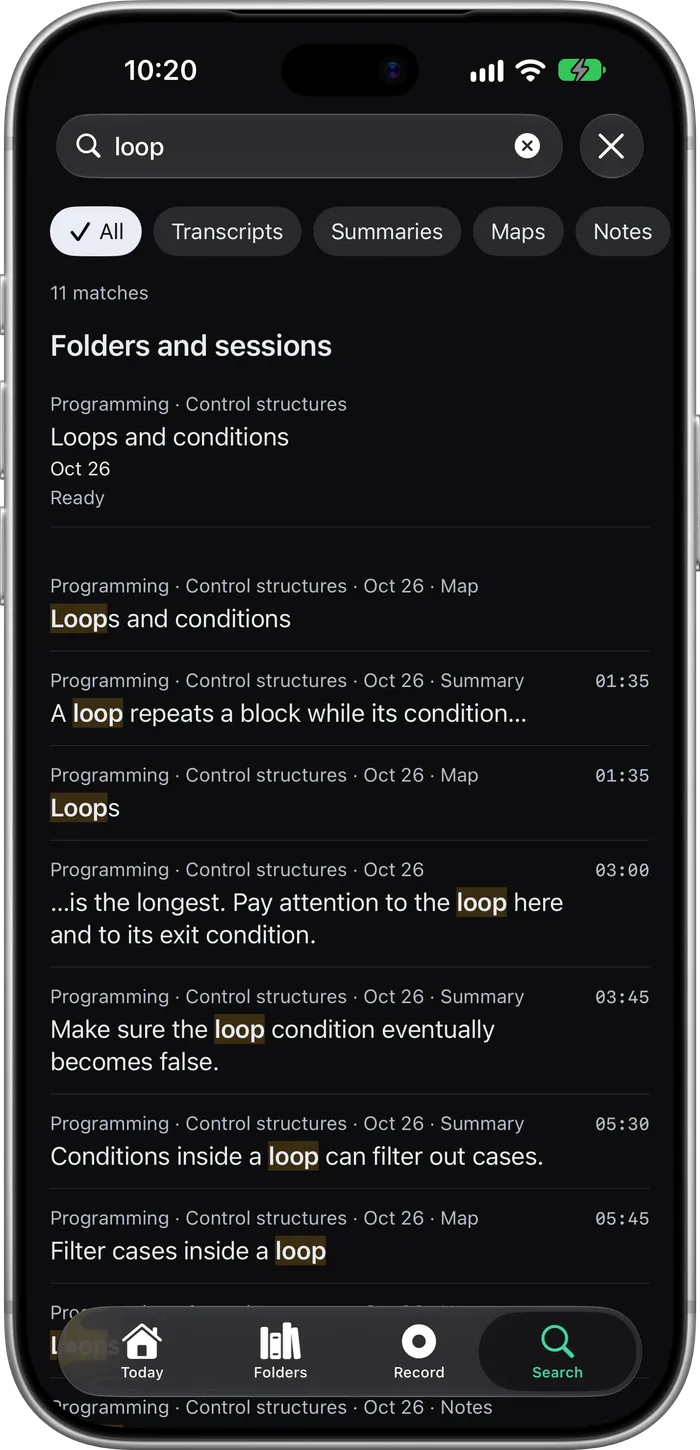
    Search for a word or a phrase across all your sessions at once: titles, transcripts, summaries and maps, with the exact minute it was said.

  • Your audio never leaves your device

    Transcripts, summaries and notes are created on your device with Apple Intelligence. Your sessions are stored in your private iCloud and sync across your devices. No servers of our own, no analytics and no ads.

The devices

Record on one, review on another.

The lecture is recorded with the phone on the desk and reviewed on a big screen. Kutu syncs your sessions through iCloud, so the one you record on your iPhone is already on your Mac when you get home.

On the Mac, you review

The transcript, the summary and the map fit in the same window at once. It is where a session really gets studied.

  • Transcript and summary, side by side

    You read what was said on one side and the key points on the other, with the player on top to hear any sentence again.

  • The topic notes, in full

    Every topic with its sections, its ideas and the minute of each, and below them all the sessions they come from.

  • It records too

    A video-call meeting or a lecture on your laptop is recorded from the Mac itself, with the same on-device processing.
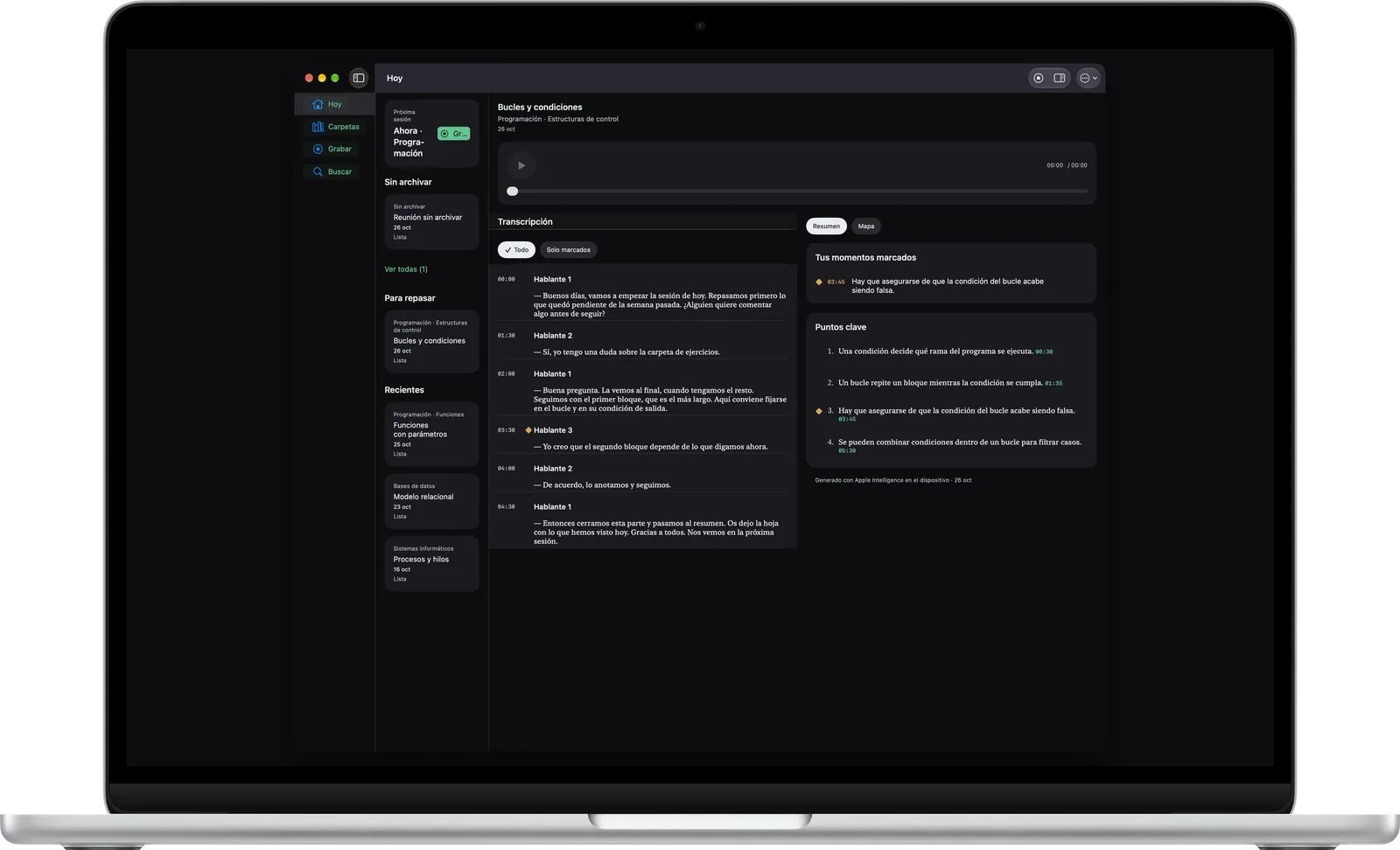
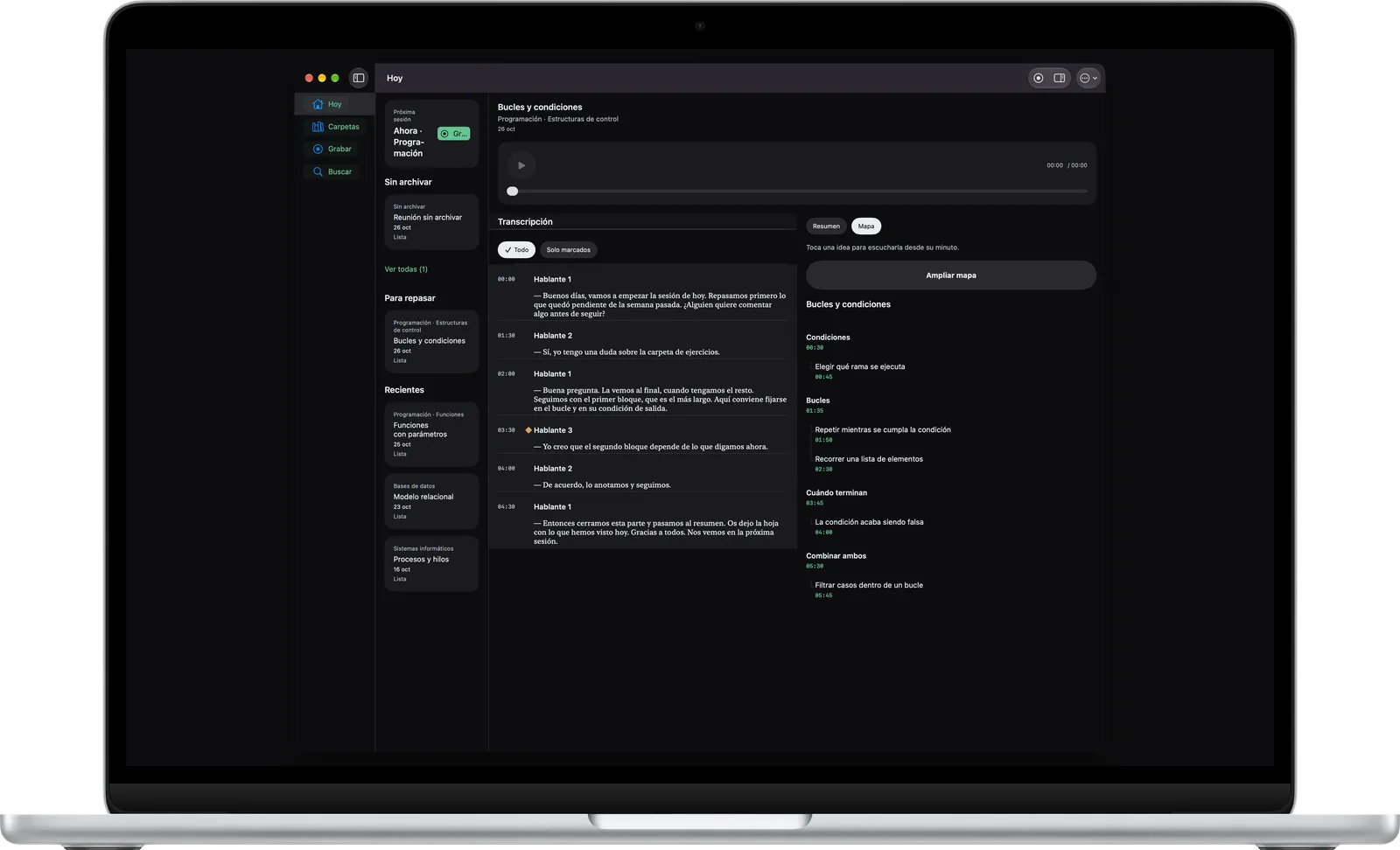
Kutu on Mac: the transcript by speaker next to the marked moments and the key points of the session
Kutu on Mac: the session transcript next to its map of ideas with their minutes
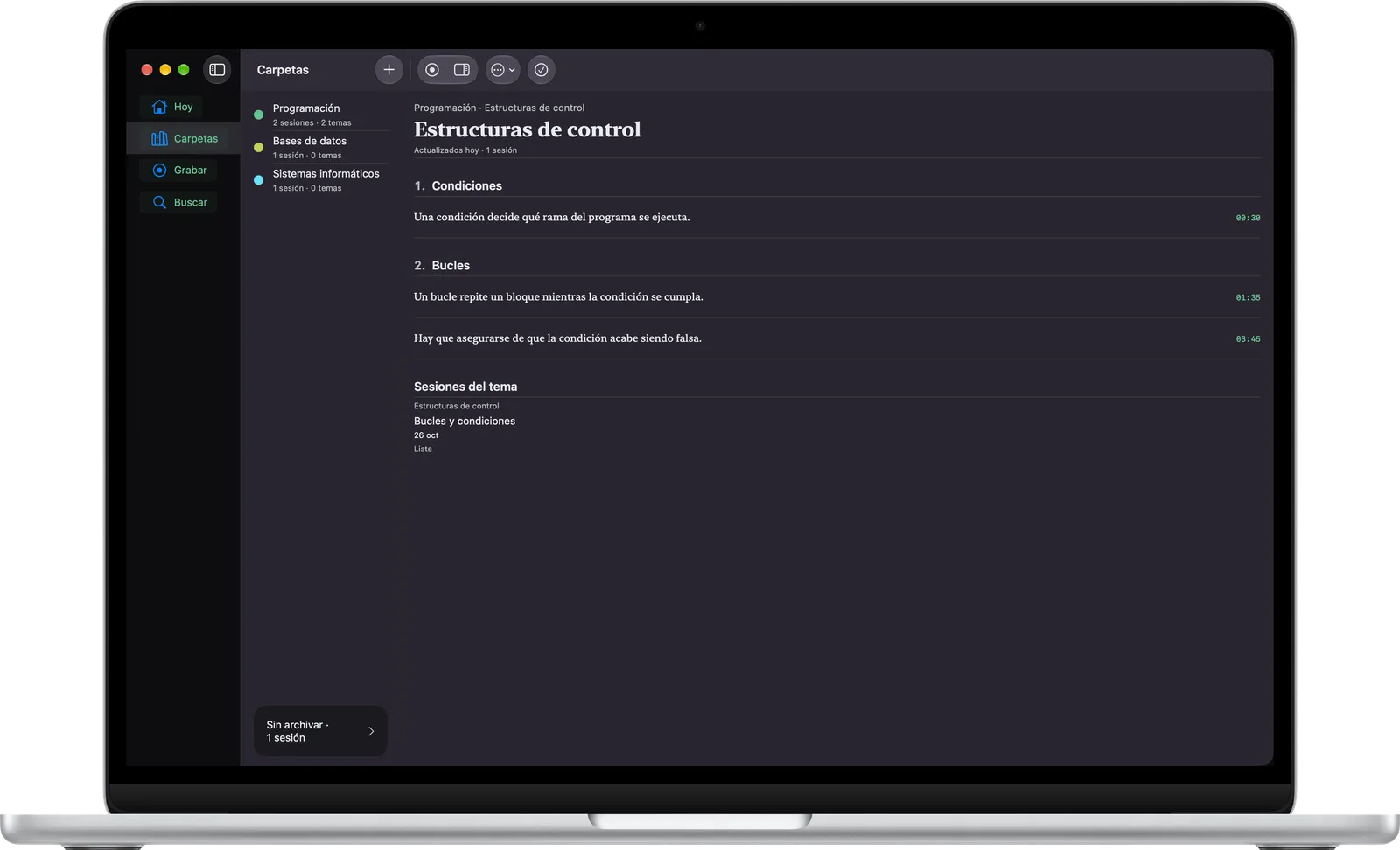
Kutu on Mac: the folders and the notes for the topic “Control structures” with the ideas in each section

On the iPad, you study

Today on the left and the session on the right, with the transcript and the summary next to each other. And the iPad records too, propped up on the lecture-hall desk.

  • The whole session on one screen

    The transcript, the marked moments and the key points at once, with the player above them.

  • The map, full screen

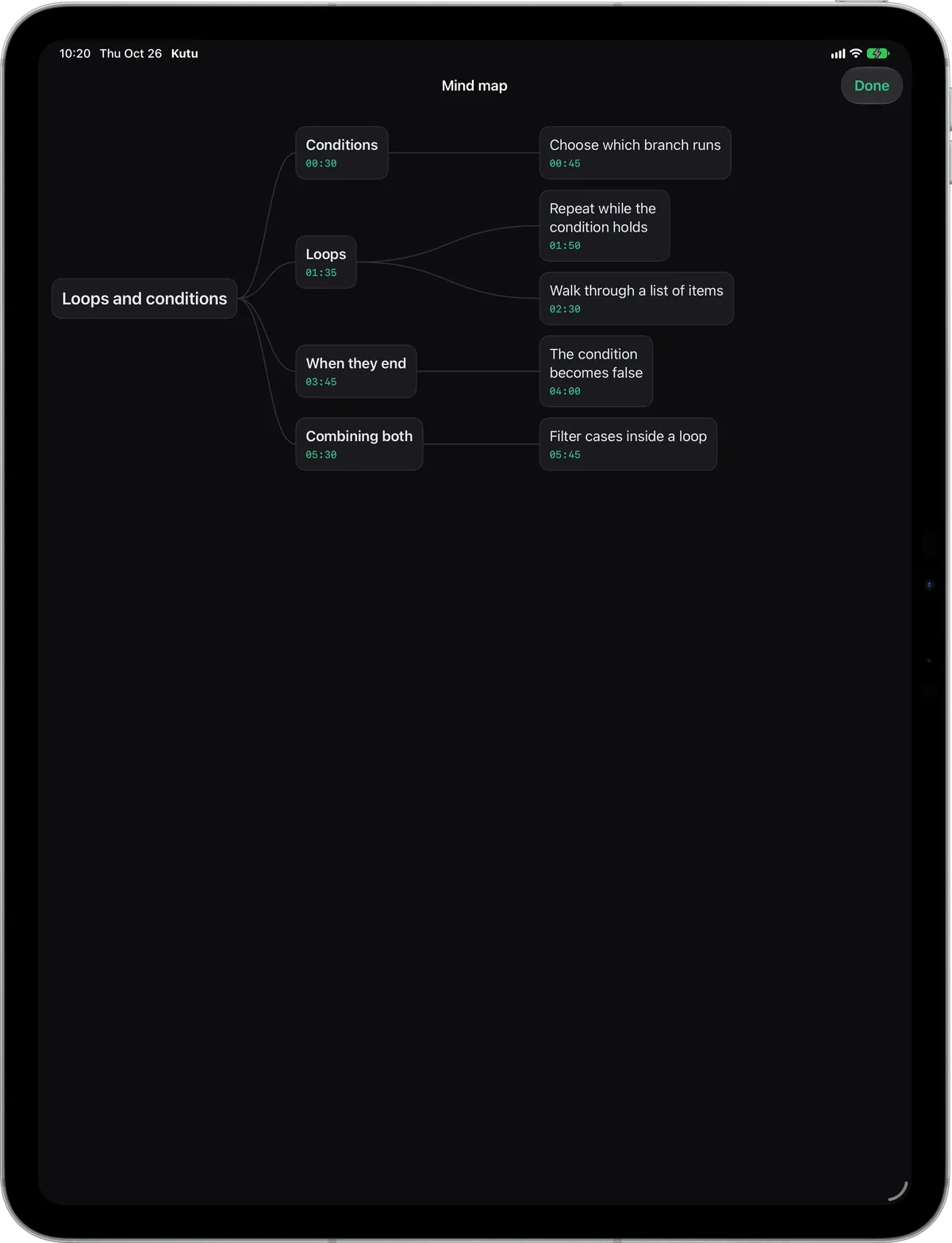
    The session’s ideas branching out with room to spare, each with the minute it was said.

  • Record with your notes in front of you

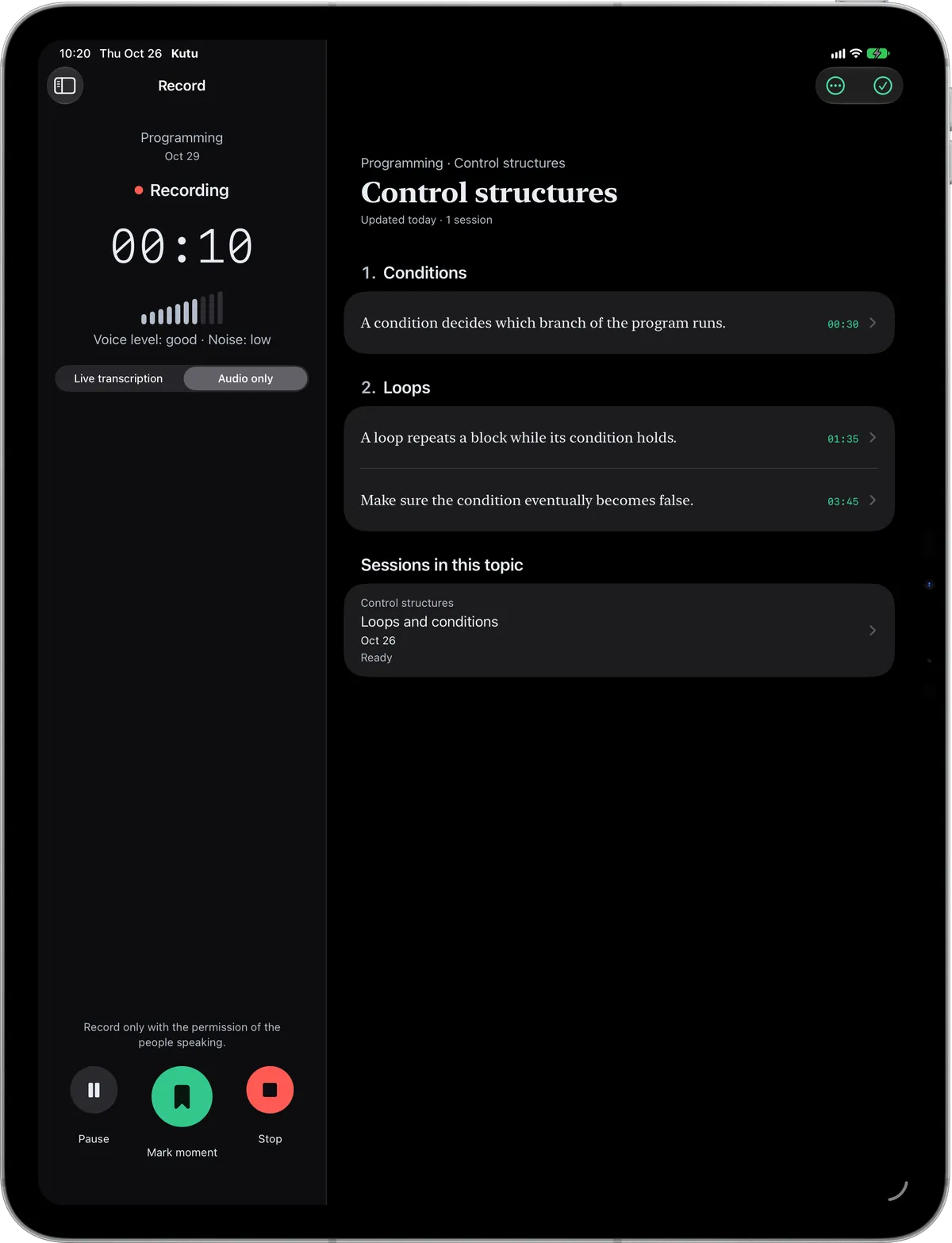
    While you record, the folder’s topic stays in view so you know where the lecture is going.

Kutu on iPad: the Today screen on the left and, on the right, the session “Loops and conditions” with its transcript by speaker and its key points
Kutu on iPad: the mind map of the session “Loops and conditions” full screen, with every idea and its minute
Kutu on iPad: recording a session with the timer and the voice level on the left and the topic notes on the right

On the iPhone, you record

It is the device you always have on you, and that is why it records most sessions.

  • Record in one tap

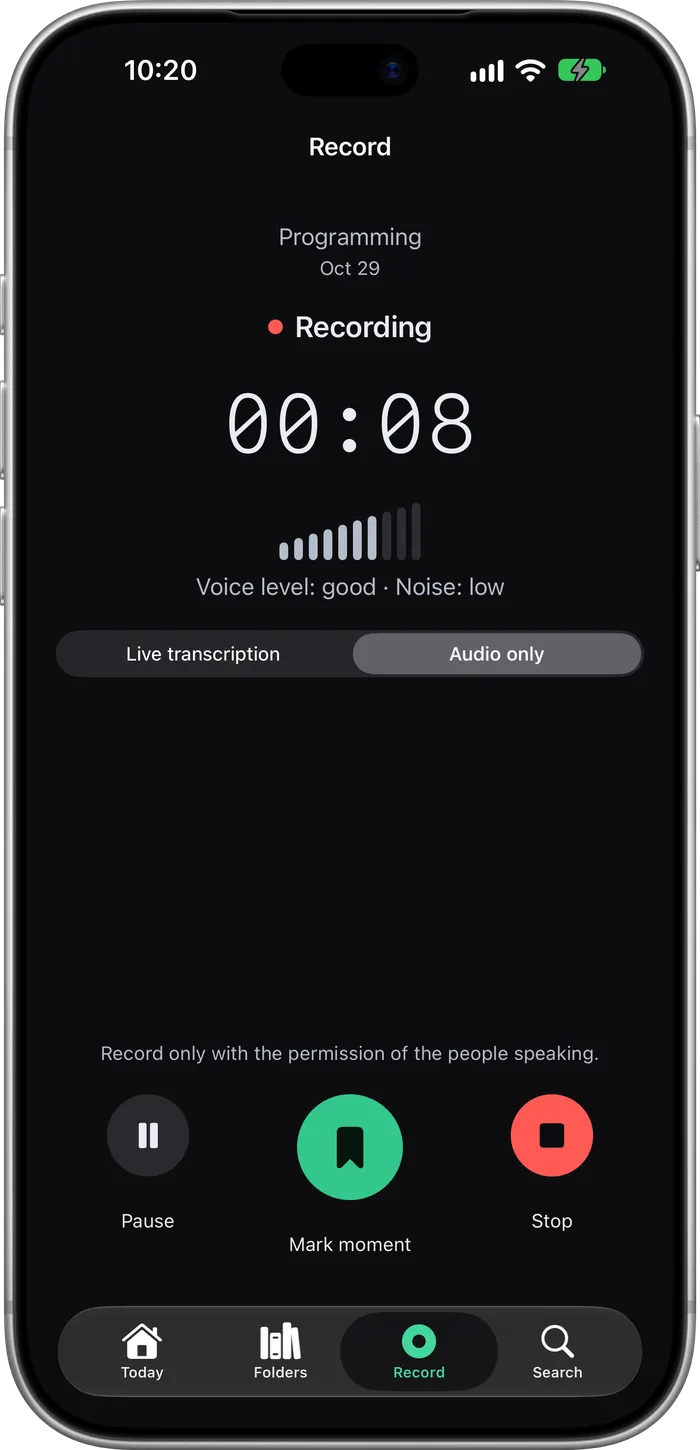
    With the folder suggested by the schedule, the voice level and the noise in view, and the buttons to pause, mark a moment and stop.

  • With the screen locked

    Recording carries on when you lock your phone, and if something interrupts it, Kutu recovers it.

  • Search across all your sessions

    Filter by transcripts, summaries or maps and jump to the minute where the word comes up.

Kutu on iPhone: recording a Programming session with the timer, the voice level, the noise and the buttons to pause, mark a moment and stop
Kutu on iPhone: the transcript of the session “Loops and conditions”, with every turn split by speaker and its minute
Kutu on iPhone: a search for “loop” with eleven matches across transcripts, summaries and maps

How it works

From an hour of audio to ten minutes of review.

A long recording is little use if finding anything means listening to the whole thing again. Kutu does the tidying up: what was said, who said it and what matters.

  1. Record

    Tap Record and Kutu suggests the folder that is due by its schedule. You can watch the live transcript or record audio only, pause and mark the important moments.

  2. Transcribe

    When you stop, Kutu transcribes the session on the device and tells each speaker apart. You can keep using your phone in the meantime: the progress shows in the Dynamic Island.

  3. Summarise

    Once the transcript is ready, Apple Intelligence pulls out the key points and the map of ideas, each with the minute it was said.

  4. Review

    Sessions on the same topic come together in notes that grow with every lecture or meeting. Today reminds you what is worth reviewing.

Kutu on iPhone: the session map with the ideas grouped into conditions, loops and cases, each with its minute

Kutu needs a device that supports Apple Intelligence: that is what lets it do all this without sending your audio to any server.

Kutu isn’t for you if…

  • your iPhone, iPad or Mac doesn’t support Apple Intelligence: without it, Kutu can’t transcribe or summarise.
  • you need a verbatim transcript with legal standing, like signed minutes: Kutu prepares material to review, not official documents.
  • you want to record someone without them knowing: Kutu reminds you to ask the people speaking for permission, and says so on the recording screen itself.

€9.99 / year

One subscription. Every device.

  • iPhone
  • iPad
  • Mac

Per year, not per month. You don't pay per device: what you pay covers iPhone, iPad and Mac, and the Mac app is native, built expressly for the Mac.

Out in November 2026

Less than a coffee a month.

It works out at €0.84 a month, paid once a year. Before paying anything you get one year to use all of it, with no cut-down features. Equivalent price in your region.

Without a subscription, Kutu stays in read-only mode: your sessions, transcripts, summaries and notes are still there to look at. Only recording and processing new sessions need a subscription.

Questions before you record your first session

When is it out?

In November 2026, on the App Store for iPhone, iPad and Mac. It will be free to download, with one year to use it in full before you pay anything.

Where are my recordings stored?

On your device and, if you use iCloud, in your private CloudKit database, which only you can access. That is how a session recorded on your iPhone shows up on your iPad and your Mac. Kutu has no server, no analytics and no ads.

Is the audio uploaded anywhere to be transcribed?

No. Transcription happens on the device itself with Apple’s speech recognition, and the summary, the map and the notes with Apple Intelligence, also on the device. Your audio and your text only leave it to sync with your own iCloud. The first time, Kutu downloads the speech models it needs, without sending anything of yours.

Which devices are compatible?

The ones with Apple Intelligence: iPhone 15 Pro and later, and iPad and Mac with an M1 chip or later, running the system version listed on the App Store page. It is what allows everything to be processed on your device.

Does it tell the speakers apart?

Yes. Kutu splits the turns by voice and labels them Speaker 1, Speaker 2… with the minute of each one. It works best with the device close to whoever is speaking; with AirPods or an iPhone in the middle of the table, you notice the difference.

Can I record a lecture or a meeting?

With the permission of the people speaking. Kutu reminds you the first time you record in each folder and keeps it written on the recording screen. Many schools and companies have their own rules: check them first.

What happens when the free year ends?

It's €9.99 a year, with no monthly plan. If you don't subscribe, Kutu goes read-only: your sessions, transcripts, summaries and notes stay where they are for you to look at. Only recording and processing new sessions need a subscription.

Which devices does it run on?

iPhone, iPad and Mac, with an interface designed for each one, not a resized copy. One subscription covers them all. It works with VoiceOver, larger text and dark mode.

Which languages does it transcribe?

The app is in Spanish and English, and each folder can transcribe in either one: by default, your device’s language. This website is in four languages, but the app is in two, and we'd rather say so before you install it than after.

Kutu is out on November 2026

That day it will be on the App Store, with one year free to use in full.

A question before then? contact@falkir.es