Skip to content

Site under construction — content is for information only and is not a binding offer. Falkir is currently being incorporated. See services →

Devian

Log the breakdown next to the machine. Not in the office.

Your workshop's maintenance, out of the spreadsheet.

Devian keeps the inventory of your equipment, the history of every repair with what it cost, and a service calendar that doesn't forget. It works offline and needs no accounts.

Tell me when it's out

Out on {mes}. We'll write to you that day and for nothing else.

  • Next to the machine
  • What it cost, written down
  • Services that remind you
Devian on iPad: the inventory with the sections on the left and ten machines with their status, next service and this year's spend
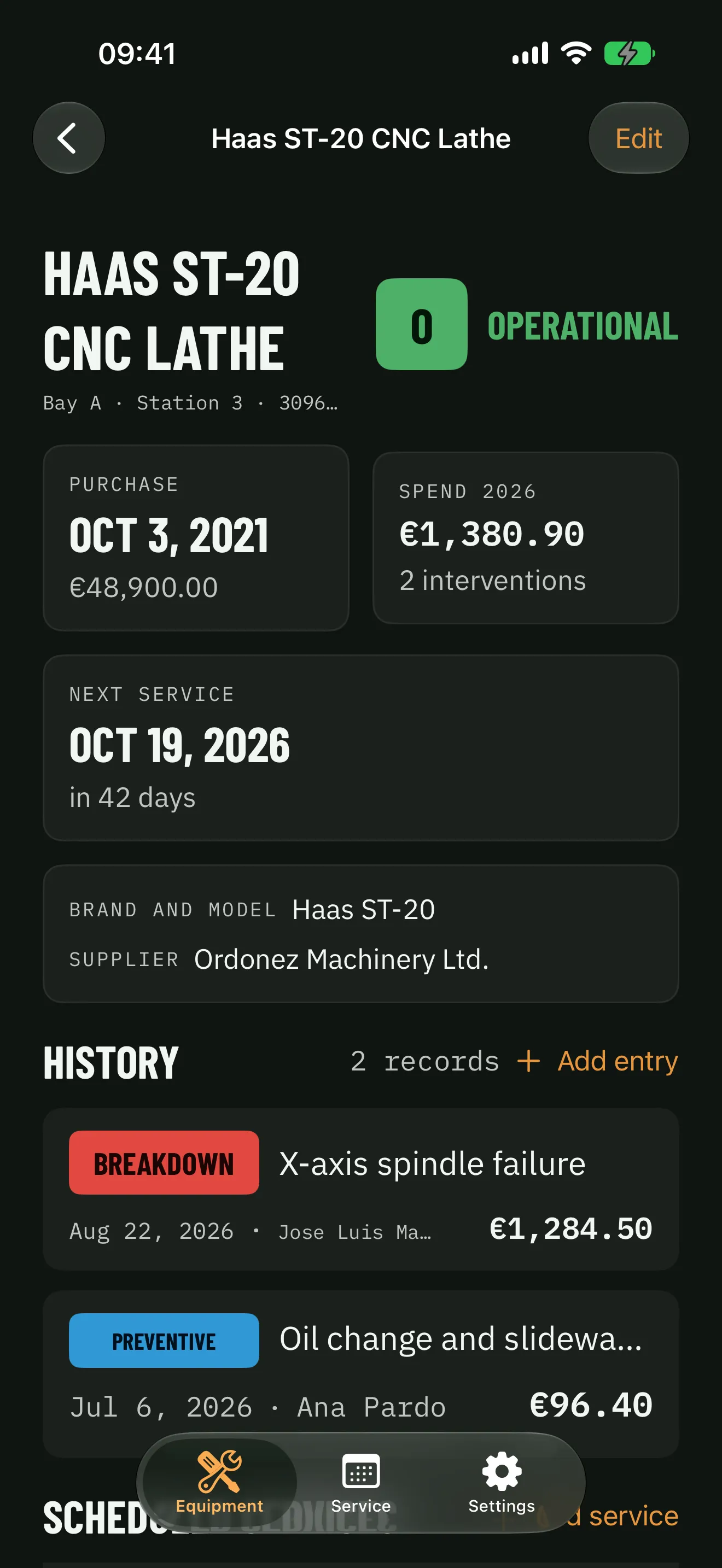
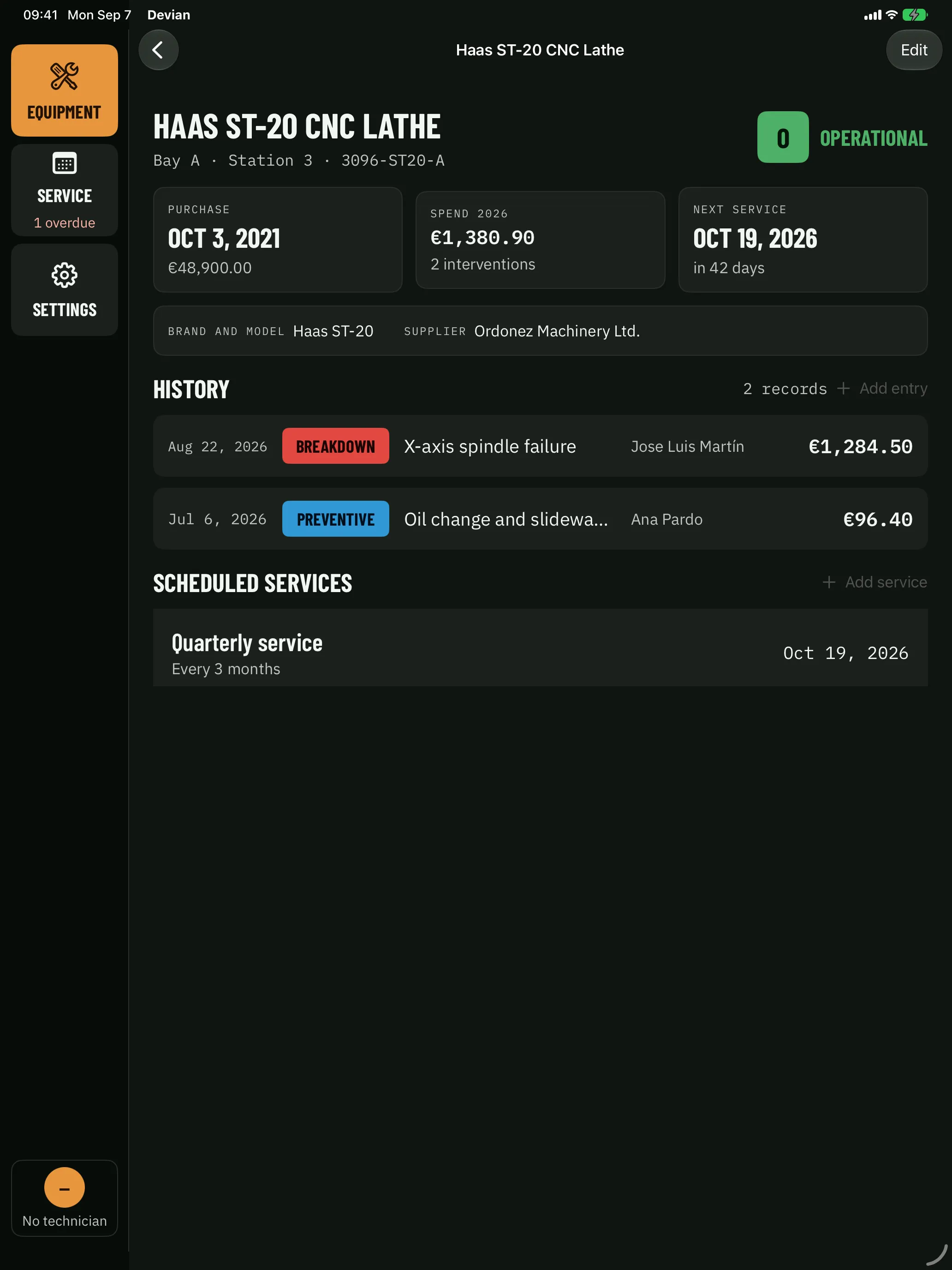
Devian on iPhone: the record of a CNC lathe with its purchase date, this year's spend, the next service and its job history
  • Next to the machine

    It lives on the workshop iPad, not on the office computer. The breakdown gets logged where it happens.

  • What it cost, written down

    Labour, parts, outside contractor and hours down per job. This year's spend, per machine and in total.

  • Services that remind you

    Every so many months, a notice on the iPad. Complete it and the preventive job is recorded by itself.

  • No accounts, no server

    A technician picker instead of passwords. The data lives in the company's iCloud and on the device itself.

  • A living inventory

    One record per machine with make, model, serial number, supplier, purchase, photos and notes. Colour-coded status and a two-level location. Search by name, and sort by what matters: what's due and what it has cost.

  • Repairs with costs

    Date, type, technician, whether an outside contractor came and from which company, downtime and the cost split into labour and parts. Quote against real cost, with invoices and quotes attached to each job.

  • Services that actually happen

    A period in months per machine and a local notification when it's due. When you complete one, Devian creates its preventive job by itself: the calendar and the history always say the same thing.

  • Several technicians, one iPad

    A picker for who's working right now. No accounts, no passwords: for a crew that knows each other, a picker is enough to record who did what.

  • Export everything, import what you had

    CSV of inventory, history and services, a PDF report of the whole fleet, and a CSV importer that brings your machines in from the spreadsheet and explains row by row what it couldn't read.

  • Offline, and no server

    In a bay with no signal you can still log a breakdown. Devian keeps everything on the device and syncs through the company's iCloud when it can. There is no server of ours: the data lives in your account, not in ours.

What the spreadsheet used to do

Three things your company already tracks. Now in the right place.

The inventory, the repairs and the services aren't three apps or three tabs of a spreadsheet. They're the same machine seen three times, and Devian ties them together.

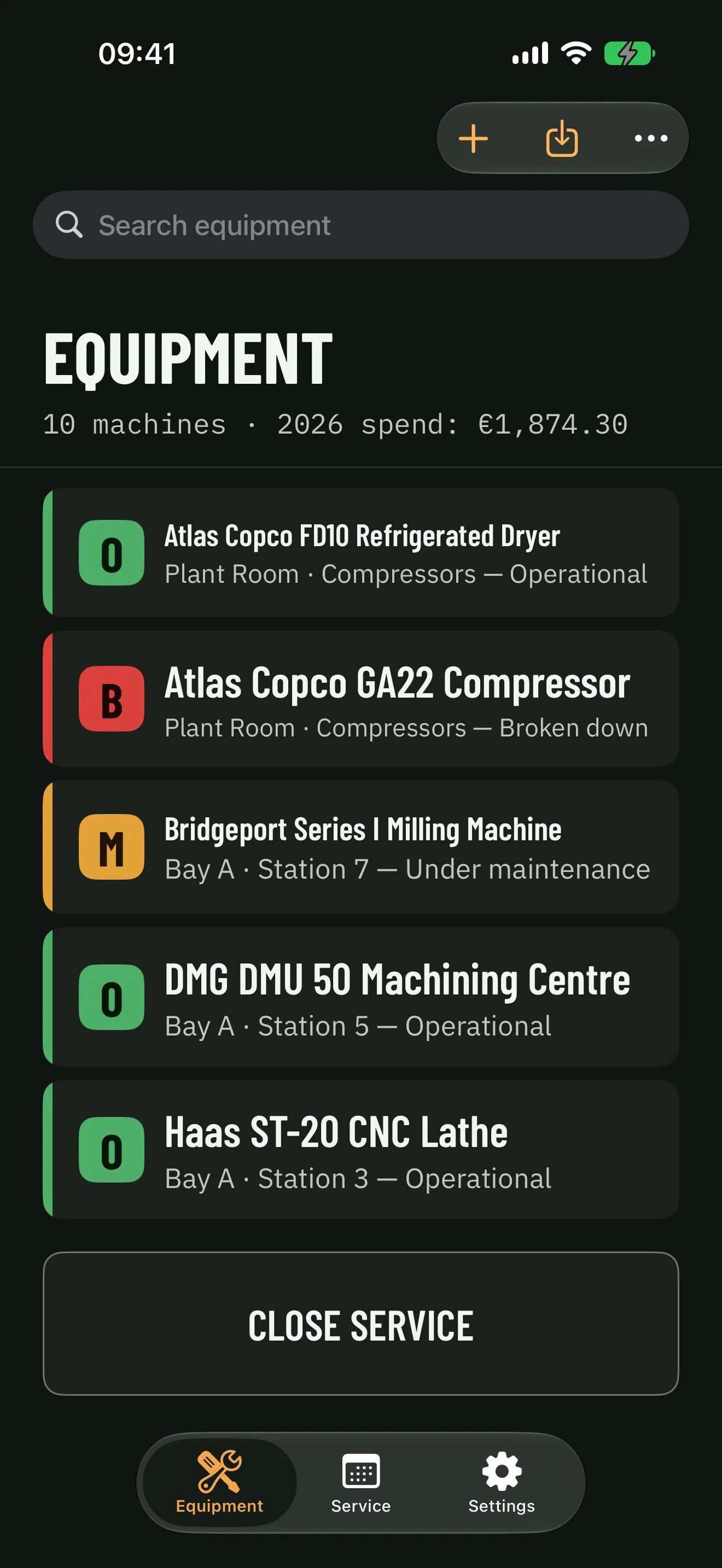
  1. Devian on iPhone: the equipment list with each machine's status in colour, and this year's spend at the top

    01

    The inventory, one record per machine

    Name, make, model, serial number, supplier, purchase date and cost, photos and notes. Location has two levels — building and area — so “pump in bay B, press area” is data, not a phrase someone retypes differently every time.

  2. Devian on iPhone: the record of a CNC lathe with its purchase date, this year's spend, the next service and its job history

    02

    The history, with what each repair cost

    Every job records the date, the type, who did it, whether an outside contractor came and from which company, how long the machine was down, and the cost split into labour and parts. When there was a quote, Devian works out the gap between the quote and what was actually paid.

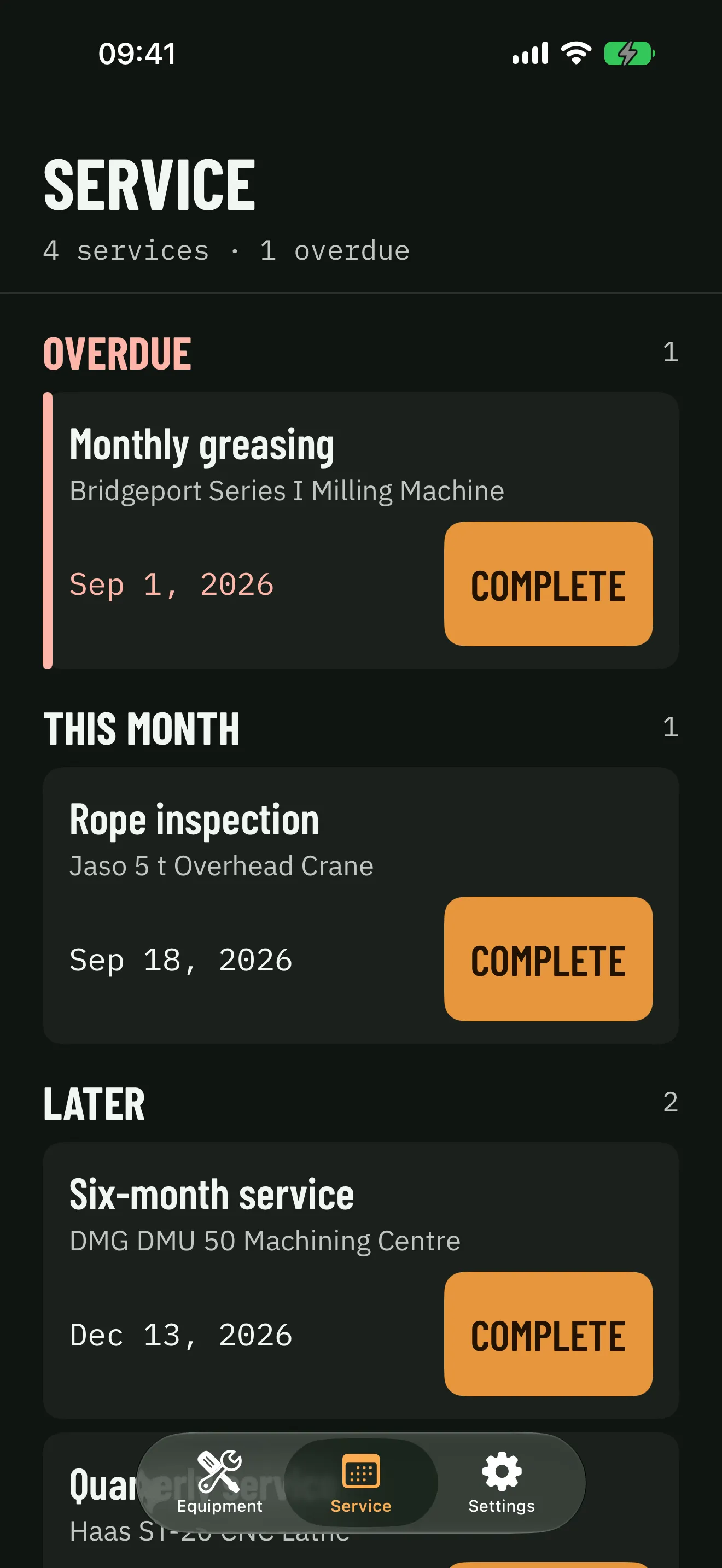
  3. Devian on iPhone: the service schedule with one overdue at the top, this month's and later ones, each with its complete button

    03

    The services, which don't get forgotten

    Schedule a service every so many months and Devian tells you when it's due. Marking it done creates its preventive job automatically, so the calendar and the history never disagree.

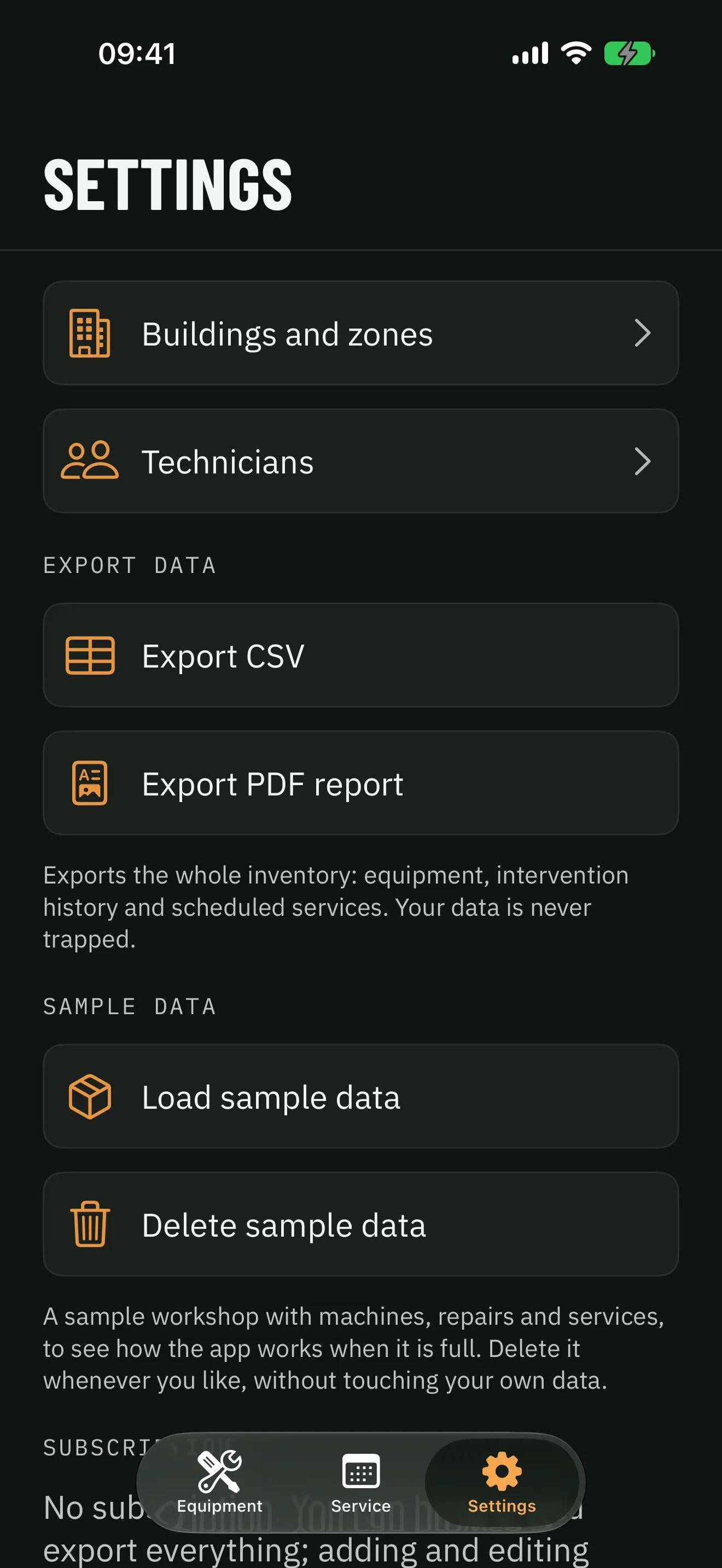
Devian on iPhone: settings with the CSV and PDF export, and the sample workshop to load and delete

Your data doesn't stay locked in

Everything comes out as CSV and PDF. And everything comes in from today's spreadsheet.

A maintenance app is bought for years. That's why the first thing Devian guarantees is the way out: the data belongs to the company, not to the app.

  • Full export

    Inventory, history and services as CSV tables that open in Numbers or Excel, plus a PDF report of the whole fleet for whoever would rather not open an app.

  • Import your machines at once

    If they're already in a spreadsheet, the CSV importer brings them in in one go and tells you, row by row, which ones it couldn't read and why.

  • A sample workshop to try it

    Ten machines with repairs and services, to see the app full before adding your own. Delete it whenever you like, without touching your data.

The two devices

The iPad stays in the workshop. The iPhone goes in your pocket.

Devian is built for the shared iPad of a crew that knows each other, and works the same on the iPhone of whoever is on call. No accounts, no passwords: a technician picker is enough to record who did what.

On the iPad you run the fleet

A column of sections, the full list of machines with their next service and this year's spend, and the technician at work bottom left.

  • Ten machines at a glance

    Status by colour and letter — operational, broken down, in maintenance, out of service — next service and this year's spend on every row. Overdue in red.

  • The record, with its history below

    Purchase, this year's spend, next service, make, supplier and the jobs in order, each with its type, who did it and what it cost.

  • Made for hands in gloves

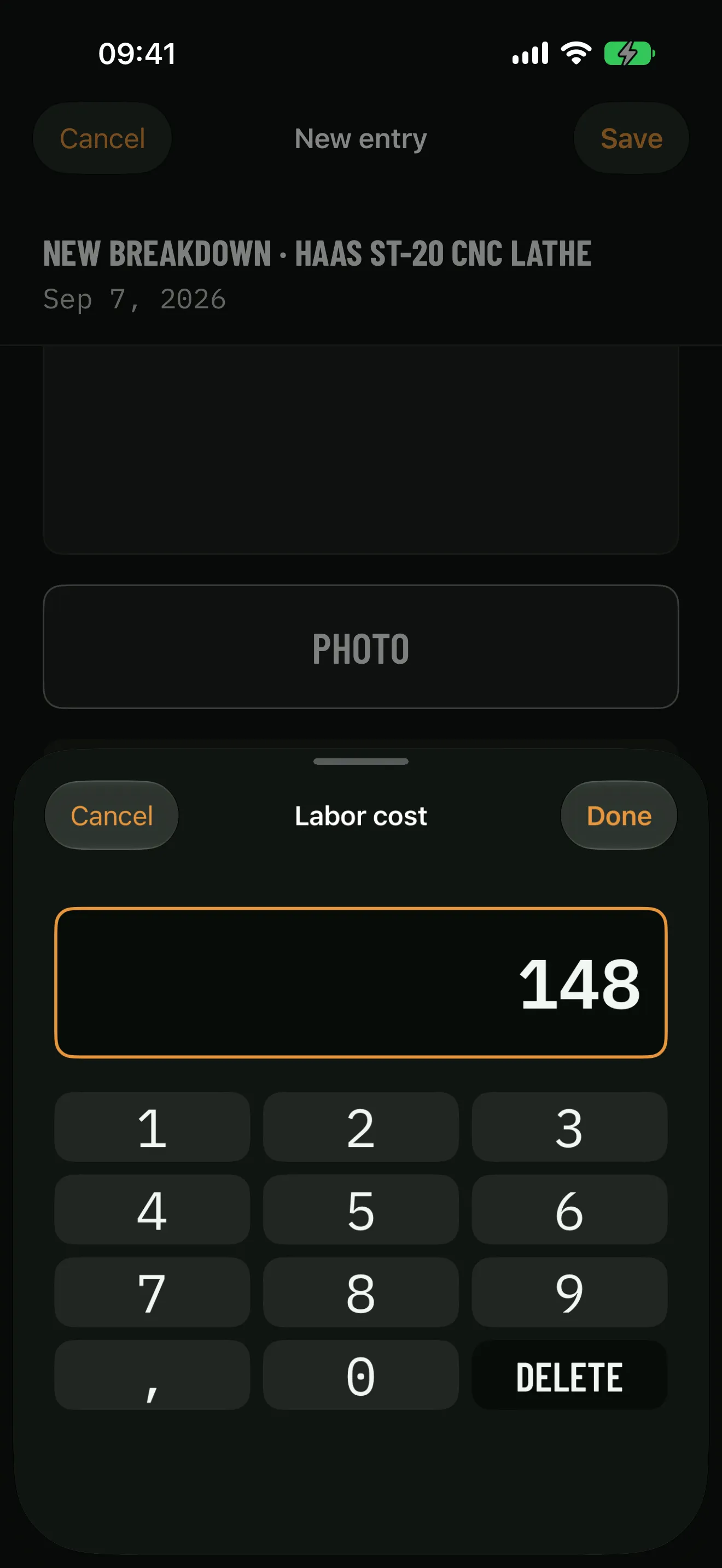
    High contrast, large text and targets you hit first time. A numeric keypad of its own for entering amounts without fighting the system one.
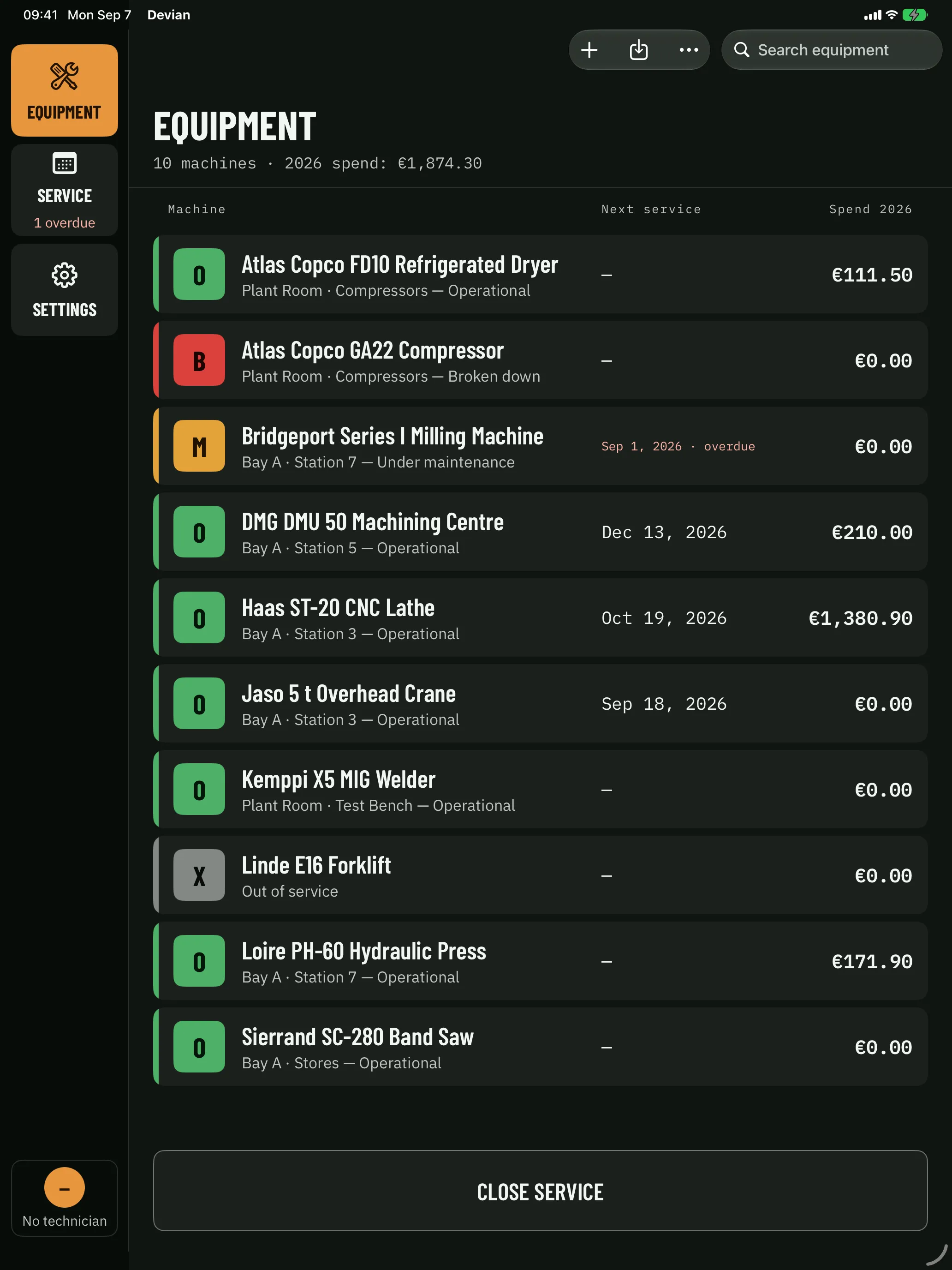
Devian on iPad: the inventory with the sections on the left and ten machines with their status, next service and this year's spend
Devian on iPad: a machine's record with its purchase details, this year's spend and its job history
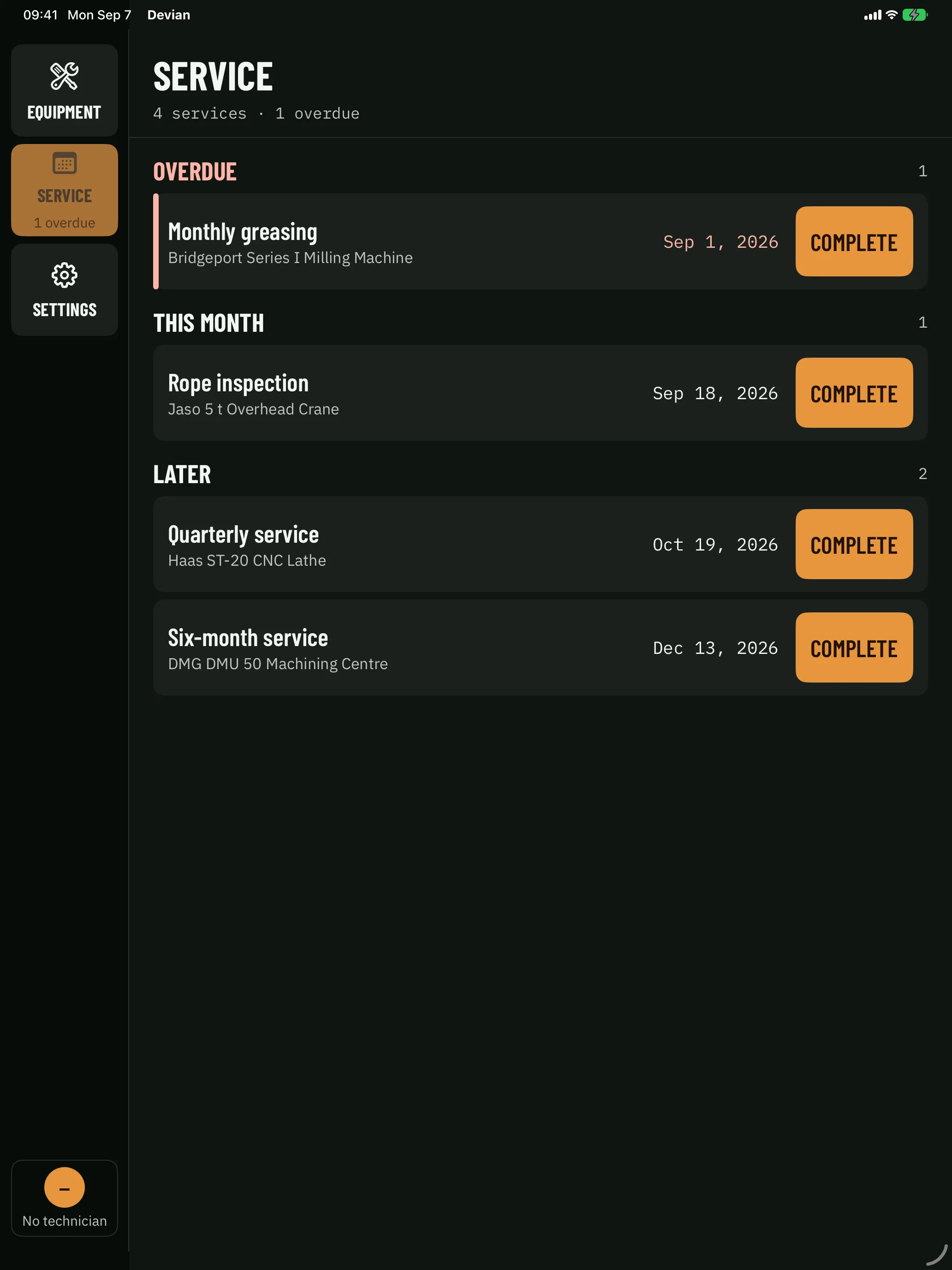
Devian on iPad: the service schedule with the overdue ones first

On the iPhone you log the breakdown

The machine stops at seven in the evening and the iPad is in the office. Devian on the iPhone has the same records, the same history and the same keypad.

  • A new breakdown in a minute

    Machine, what happened, who came, what it cost. The photo of the nameplate or the broken part attaches from the same screen.

  • Services ahead of you

    Overdue, this month and later, each with its complete button. What's due doesn't depend on anyone remembering.

Devian on iPhone: the app's own numeric keypad entering the labour cost of a new breakdown
Devian on iPhone: the equipment list with each machine's status in colour, and this year's spend at the top
Devian on iPhone: the service schedule with one overdue at the top, this month's and later ones, each with its complete button

€24.99 / year

One subscription, every device in the workshop.

  • iPhone
  • iPad

It's paid through the company's Apple account, not per device: the iPad in the bay, the one in the office and the on-call iPhone are the same payment.

Tell me when it's out

One subscription per company. Not per technician.

Before paying anything you get 1 year to use all of it, with the whole workshop. Maintenance is budgeted per year, and so is the app: yearly, with no monthly plan.

Without a subscription, browsing the inventory and the history and exporting everything to CSV and PDF stays free, forever. What needs a subscription is adding machines, logging repairs and scheduling services.

Questions that come in from the shop floor

Who is Devian for?

For a small company with machinery that tracks maintenance in a spreadsheet today: a workshop, a warehouse, an industrial kitchen, a small fleet. If you have between five and a hundred machines and an iPad, it's for you. If you have a maintenance department running asset-management software, probably not.

When is it out?

On October 24, 2026. Leave your email and we'll write to you the day it's out, and for nothing else.

Does it work without iCloud and without signal?

Yes to both. Devian keeps everything on the iPad itself and syncs with the company's iCloud when there's a connection. Without an iCloud account it works the same, locally, without syncing between devices.

How does it know who did each job if there are no users?

With a technician picker inside the app. Technicians are added in Settings and whoever is about to work picks themselves from the list. No passwords: for a crew that knows each other that's enough, and it avoids a login screen on a shared iPad.

My machines are already in a spreadsheet. Do I have to type them in again?

No. Export the sheet as CSV and Devian's importer reads it in one go. It tells you row by row which ones it couldn't understand and why, so you can fix them before importing.

What happens if I stop paying?

It's €24.99 a year per company, with 1 year free. Without a subscription Devian still opens: you browse the inventory and the history and export everything to CSV and PDF without limits. What stops is adding machines, logging repairs and scheduling services. The data belongs to the company and is never locked in.

Where is the company's data?

On the device itself and in the private iCloud database of the company's Apple account. There is no Devian server: we never receive or see any data. No analytics, no advertising, no third parties.

Which languages is the app in?

Spanish and English. This website is in four languages, but the app is in two, and we'd rather say so before you leave your email than after.

What about the Mac?

Not yet. Devian ships for iPhone and iPad, which is where the workshop is. The PDF report and the CSV tables open on any computer.

Shall we talk?

One email when there’s something worth telling. Not one more — we promise on January’s snow.

Rather write to us directly? contact@falkir.es