Skip to content

Site under construction — content is for information only and is not a binding offer. Falkir is currently being incorporated. See services →

Olena

The day you actually have, not the one you wish you had.

Your real calendar and a full GTD system, finally on the same screen.

Olena puts your real calendar events and your GTD tasks on the same timeline.

Tell me when it ships
  • Your actual calendar
  • Full GTD, not decorative
  • Focus, Pomodoro and routines
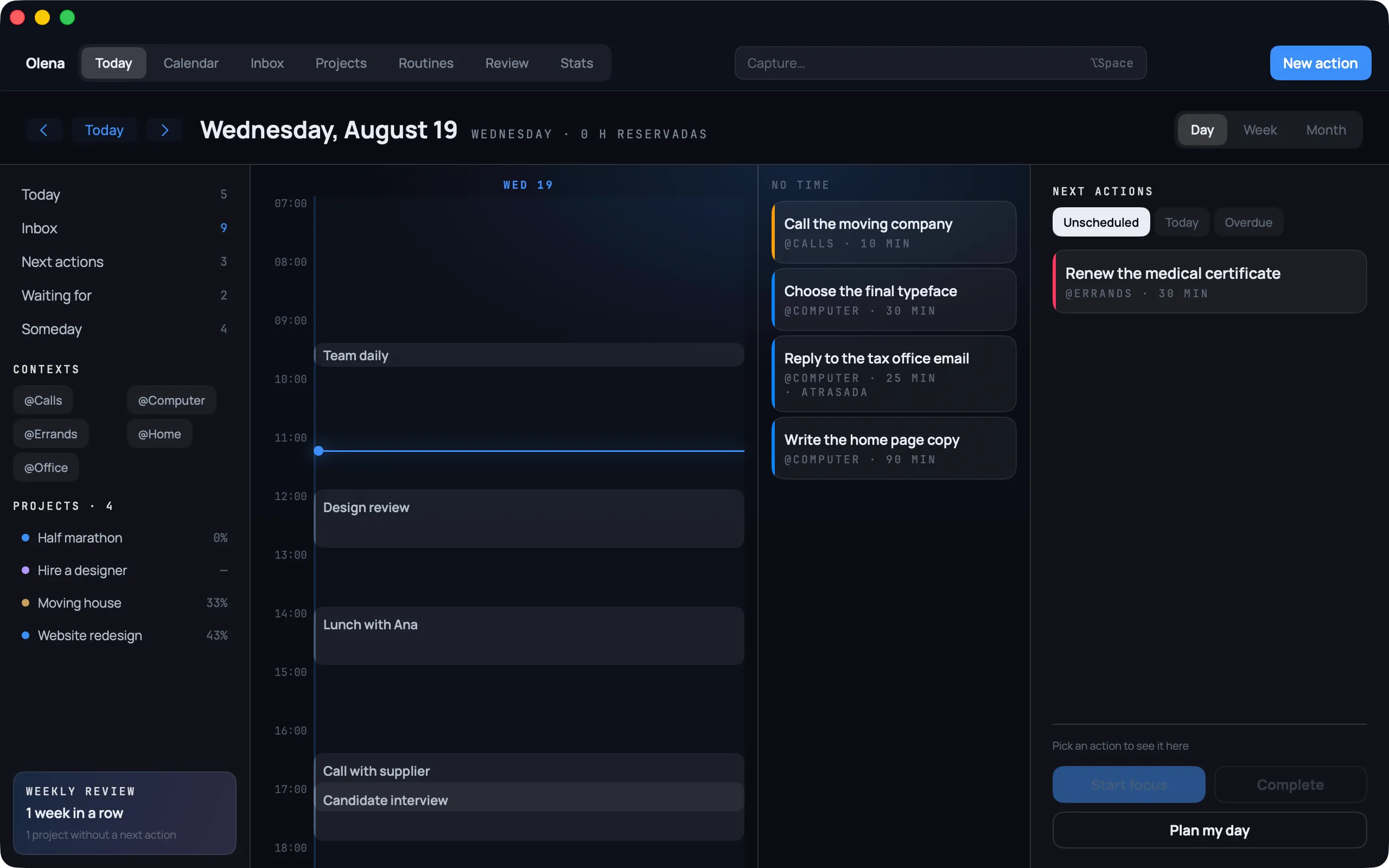
Olena on Mac: the day with the timeline, untimed tasks, next actions and the projects with their progress in the sidebar
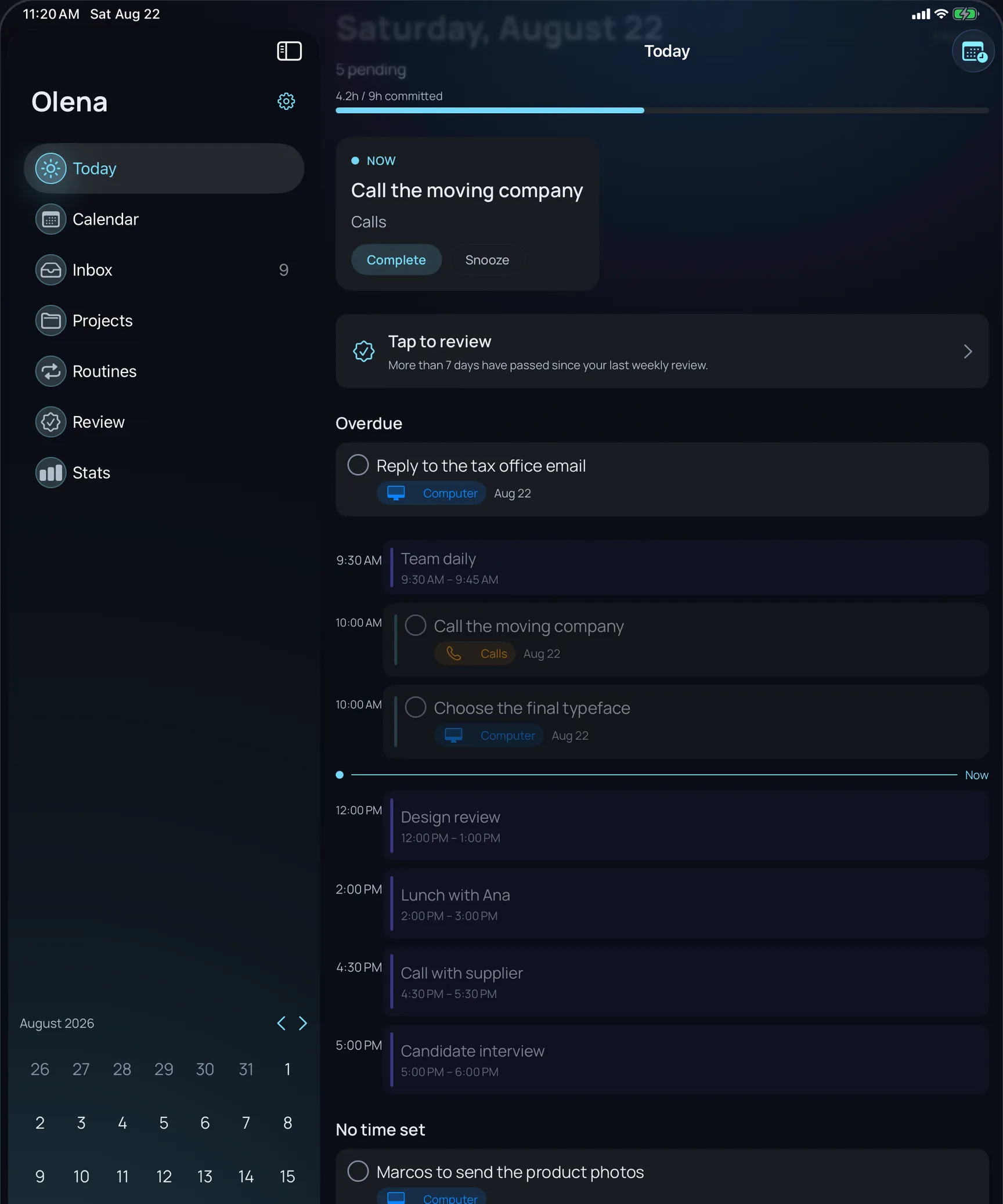
Olena on iPad: the Today view with the calendar and tasks on a single timeline
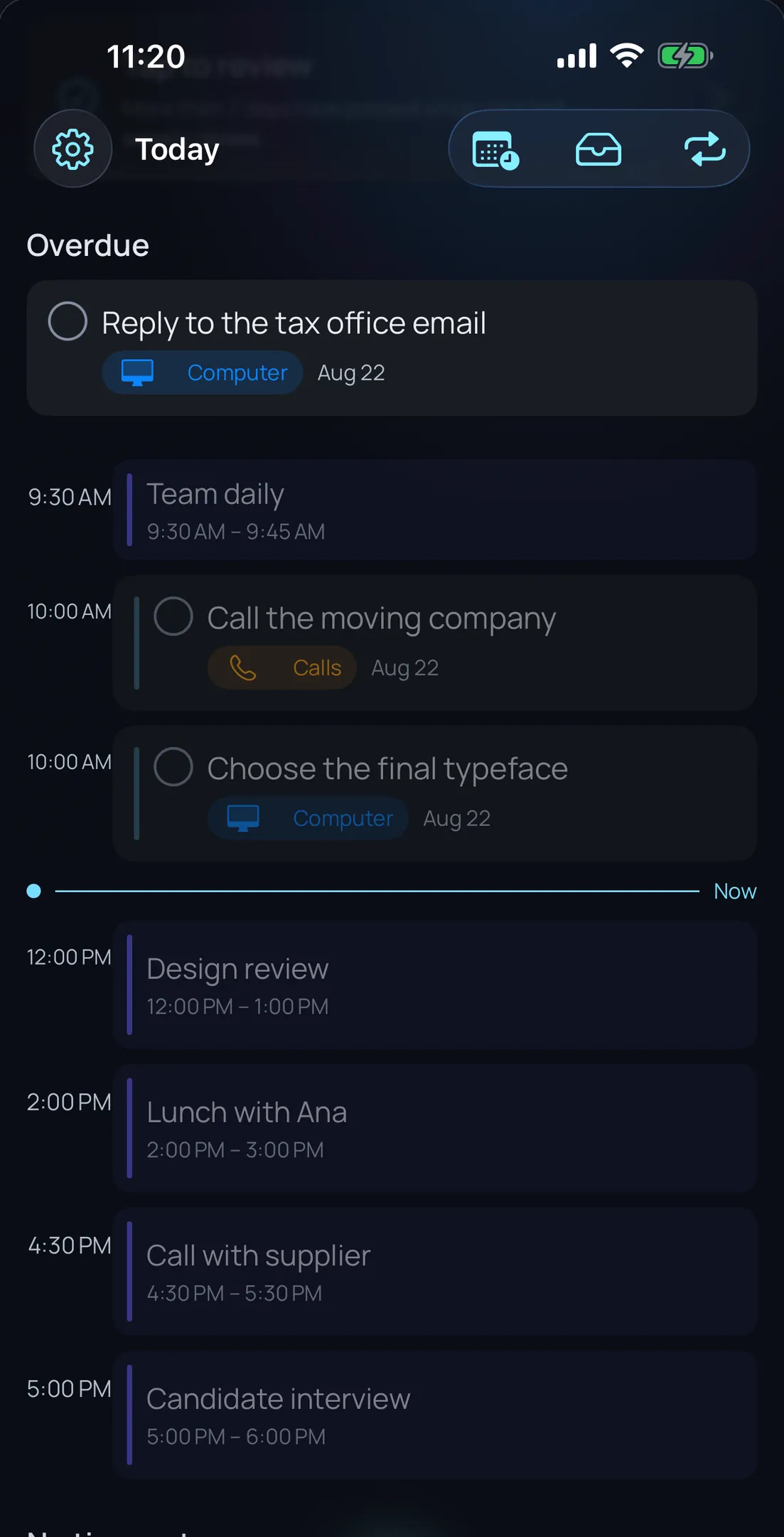
Olena on iPhone: the Today view with calendar events and tasks on a single timeline, and the current-time marker
  • Your actual calendar

    Not a copy, not an import: the real events from your iPhone, on the same timeline as your tasks.

  • Full GTD, not decorative

    Inbox, clarify, projects, areas, contexts, perspectives and a weekly review. The whole method, not three borrowed words.

  • Focus, Pomodoro and routines

    What you do once and what you do every day, in the same app. No need to install a second one.

  • No servers. None.

    There is no Olena backend. Your data lives on your device and syncs through your own private iCloud.

  • A real merge

    Not a task list with dates of its own: your actual calendar events living alongside inbox, projects, areas and contexts. Drag a dateless task onto a free slot, or let Plan Your Day suggest where it fits.

  • Natural language capture

    Type “lunch with Ana tomorrow 2pm @calls” and Olena works out the date, the context and the project on its own. Two seconds from thought to inbox.

  • Focus and Pomodoro

    Work and break blocks with the countdown on the Lock Screen, in the Dynamic Island and on the Apple Watch, plus streak statistics so you can see whether the week went the way you thought.

  • An iPad app, not a stretched phone

    A sidebar with a mini-calendar, not a resized copy of the iPhone screen. With a keyboard and trackpad it behaves the way it should.

  • No servers. None.

    Your data lives on your device with SwiftData and syncs through your own private iCloud container. There is no Olena server because none exists: nothing to leak, nobody to sell to.

  • A full year of free trial

    The whole product, for everyone, from day one. No trimmed-down free tier. When it expires the app becomes read-only: you never lose access to your data.

All three devices

Each one handles the part of the method it’s best at.

GTD doesn’t happen in one place. You capture it standing in the street, you sort it out on the sofa, and you review it sitting down. Olena isn’t the same screen three times: it’s the same system, with the right device for each moment.

The Mac is where you think

The whole day, your next actions and your projects fit in one window at once. It’s where you see whether the week adds up, or where it stops adding up, and where you plan with a keyboard.

  • The whole day in one window

    The timeline with your real events, what has no time yet, your next actions and your projects with their progress, all at once. No going back and forth between screens to work out whether the day can take one more thing.

  • Plan your day, and Olena lays it out

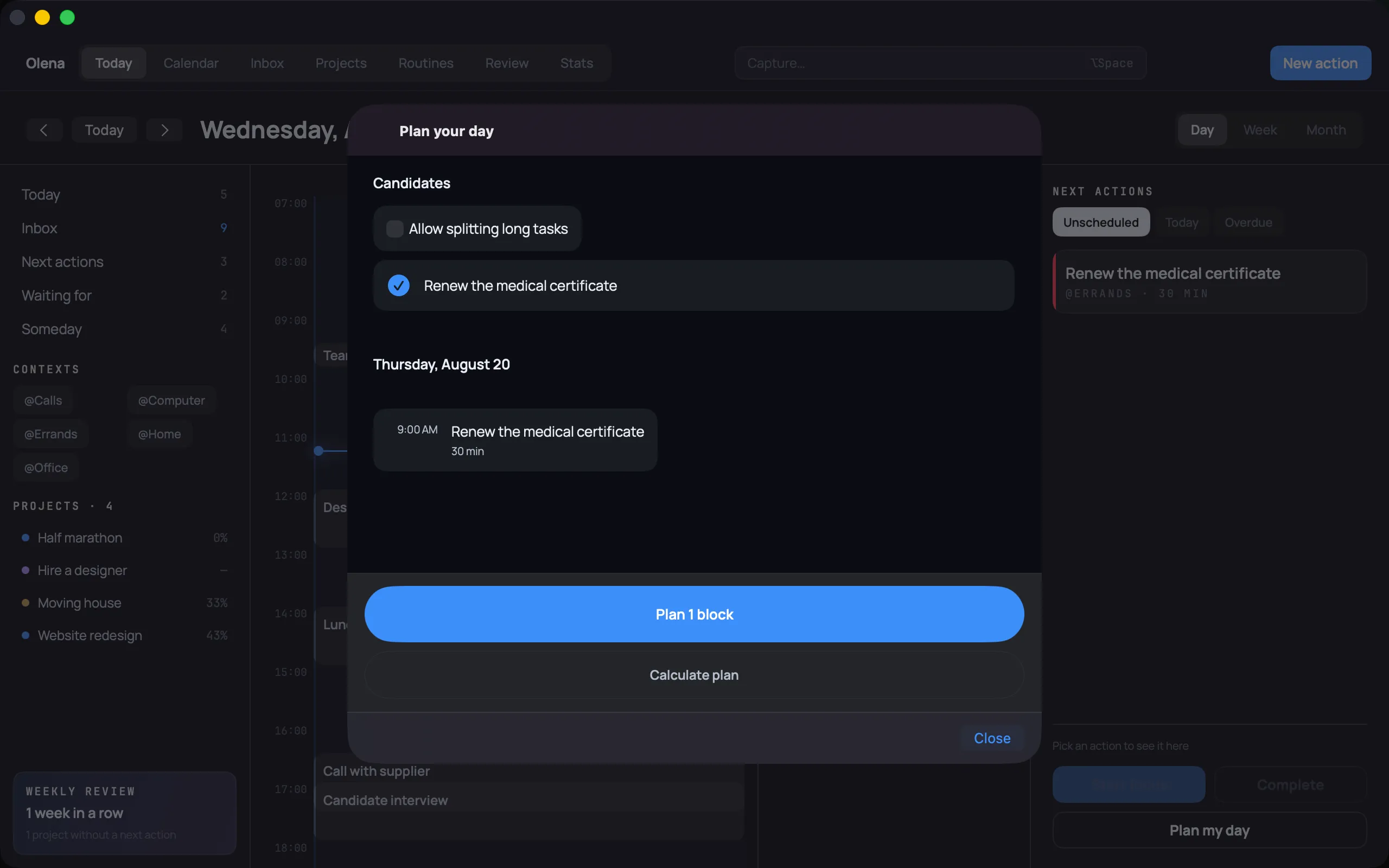
    You pick the candidates and Olena places them in the free slots of the calendar, as blocks. If a long task doesn’t fit, it can split it. Whatever doesn’t fit you see before you promise it, not on Thursday.

  • The month at a glance

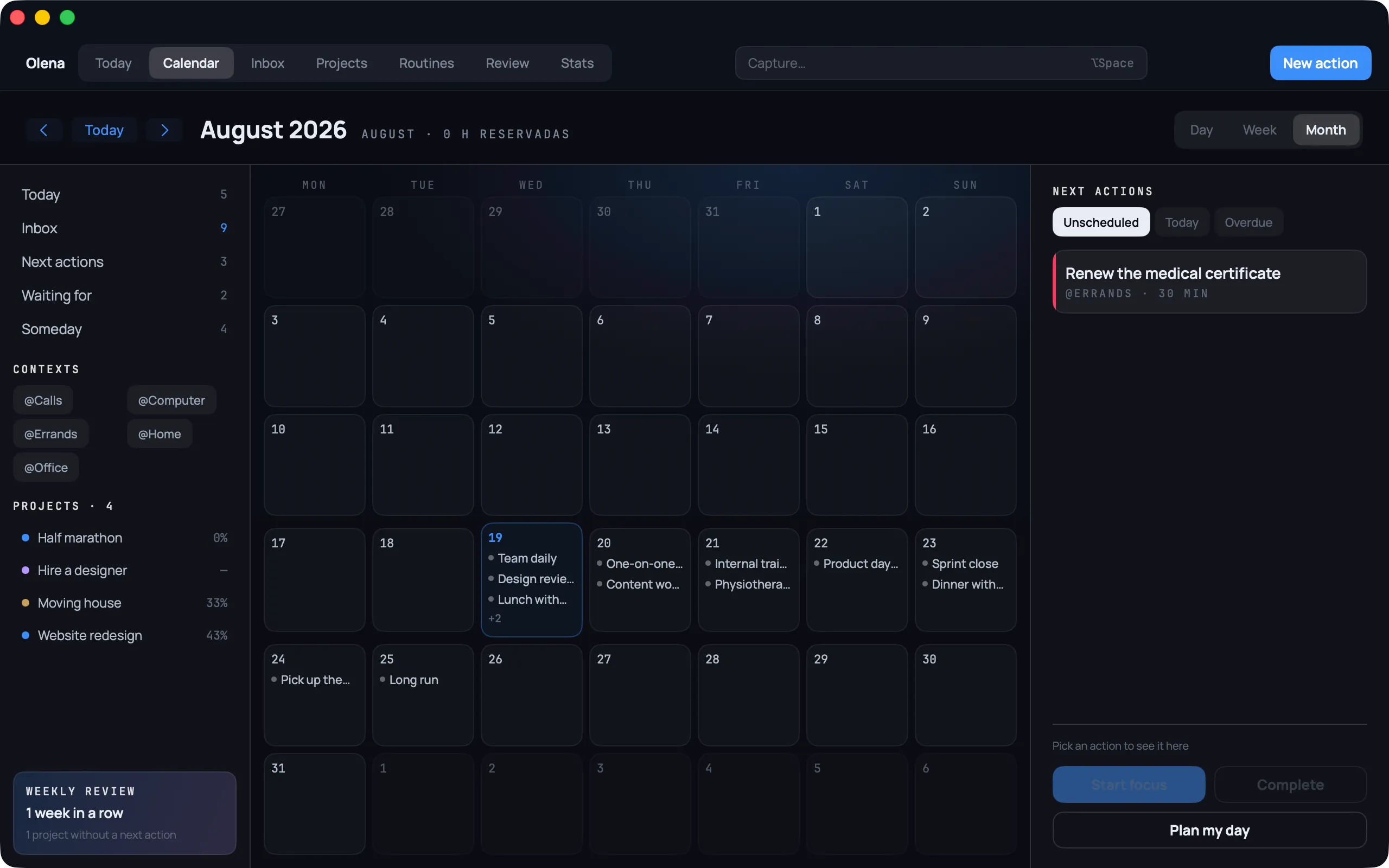
    Day, week or month with the system’s events and timed tasks on the same grid. And a fixed notice, bottom left, of when the last weekly review was and which project has been left without a next action.

Olena on Mac: the day with the timeline, untimed tasks, next actions and the projects with their progress in the sidebar
Olena on Mac: the “Plan your day” sheet with the candidates and the block proposed for tomorrow
Olena on Mac: the calendar in month view with the system’s real events and next actions alongside

The iPad is where you sort it out

Clarifying and organising is handwork: moving things around until the day has a shape. That wants a screen with room for the calendar and the list at once, and a finger.

  • Drag it until it fits

    You pick up an undated task and drop it into a free slot. It stops being an intention and becomes a commitment with a time on it. And if it doesn’t fit, you find out before you promise it — the only way a plan is worth anything.

  • The calendar and the list, together

    The sidebar shows the mini calendar and your perspectives alongside the timeline. No going back and forth between two screens to work out whether the day can take one more thing.

  • Empty the inbox in one sitting

    Clarifying is answering the same question many times over. With a keyboard and trackpad you work down the inbox queue at a rhythm, without lifting your hand off the desk.

Olena on iPad: the Today view with the calendar and tasks on a single timeline

The iPhone is where it all goes in

The system is only trustworthy if everything is in it, and everything is only in it if putting it there costs less than remembering it. That’s why capture is the one thing that really matters on the device you carry.

  • Two seconds, or you’ll stop doing it

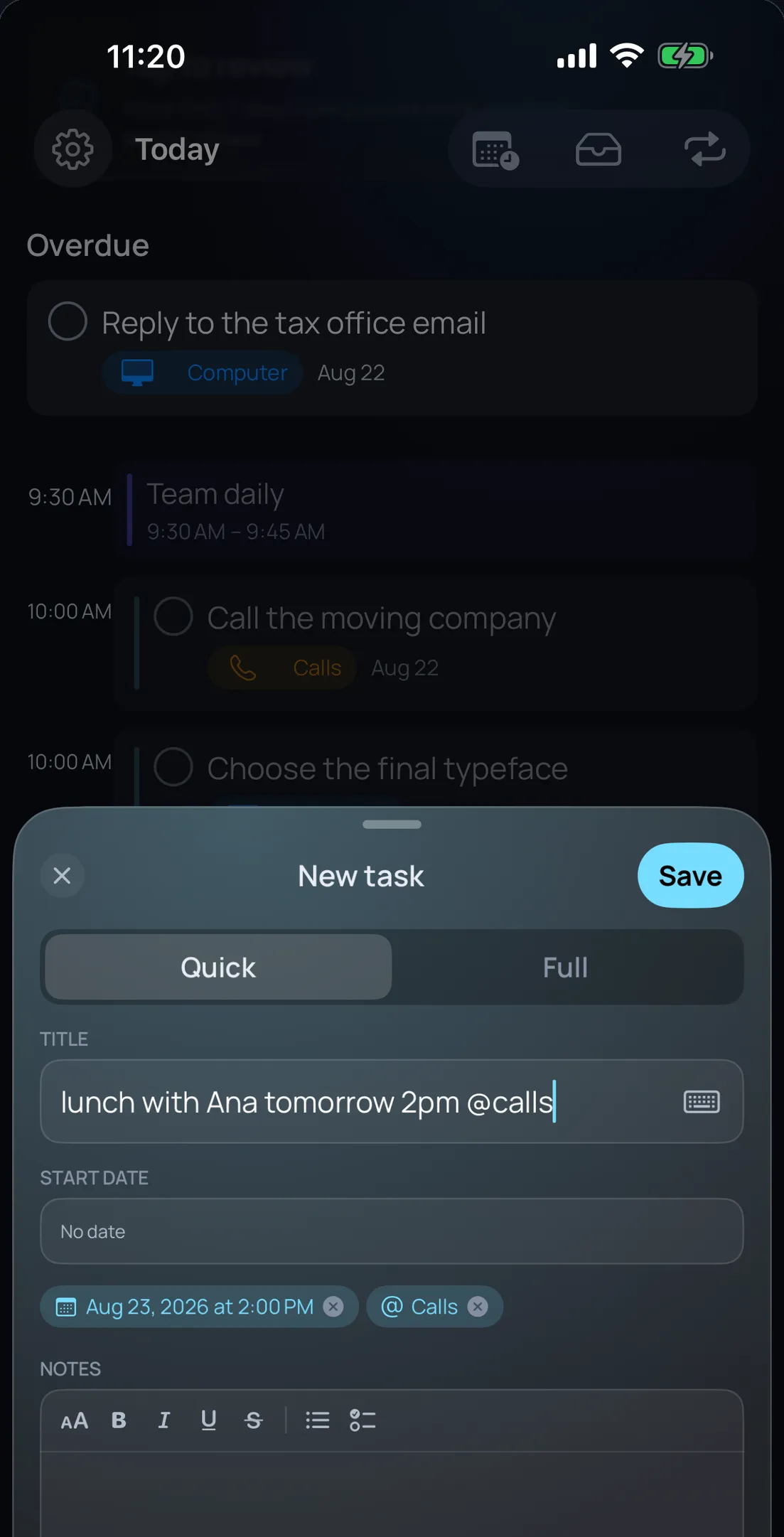
    Type “lunch with Ana tomorrow 2pm @calls” and Olena works out the date, the context and the project on its own. It isn’t a convenience: it’s the line below which capturing becomes a habit and above which it gets abandoned.

  • If it doesn’t land here, it lands nowhere

    The phone is the one device that’s always on you, so it’s the one place where the single inbox the method calls for can actually live. The moment something gets jotted down somewhere else — a stray note, a message to yourself — there stops being one system to trust, and GTD only works with one.

Olena on iPhone: typing “lunch with Ana tomorrow 2pm @calls” and the app picking up the date and the context on its own
Olena on iPhone: the Today view with calendar events and tasks on a single timeline, and the current-time marker
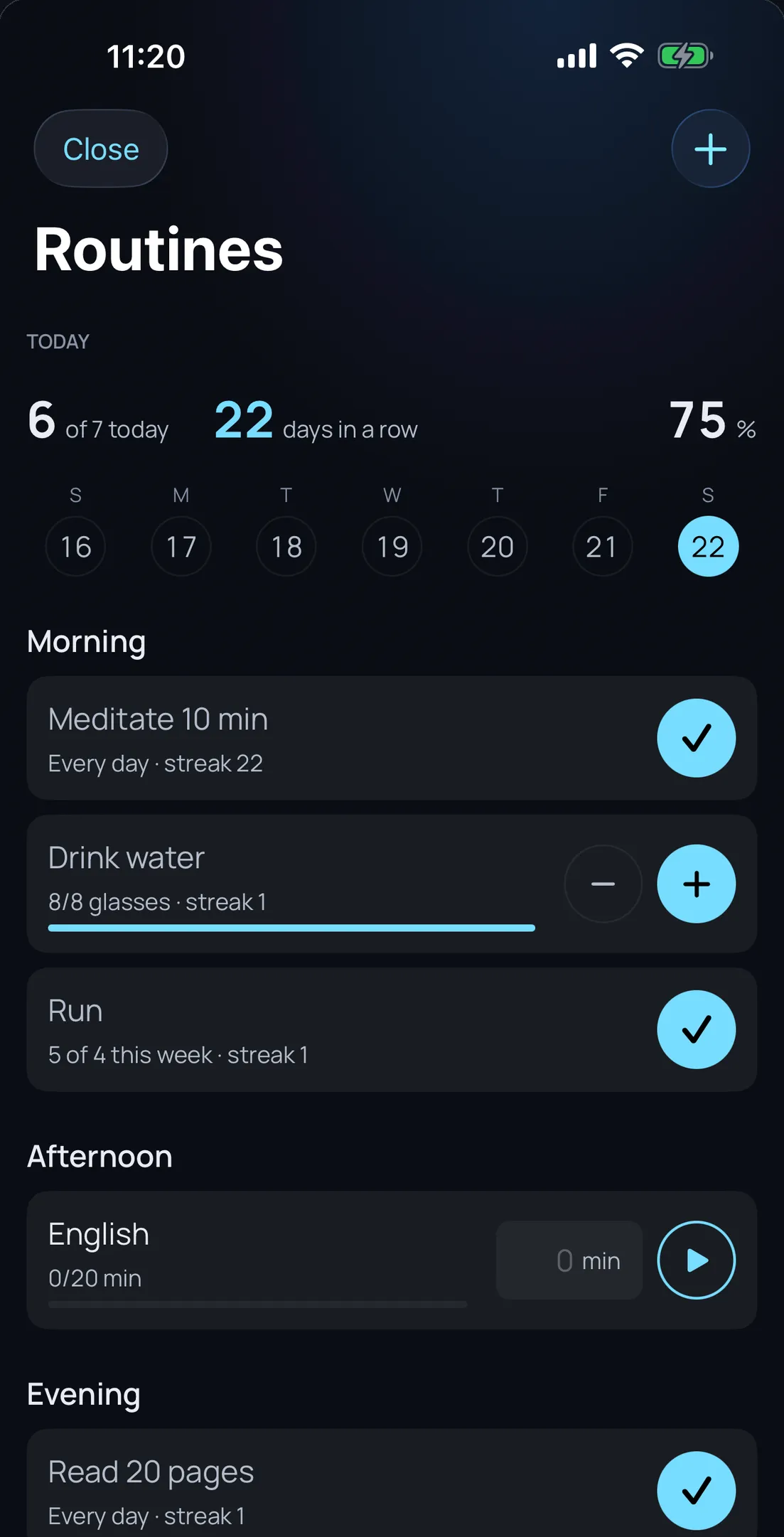
Olena on iPhone: the day’s routines grouped into morning, afternoon and night, with the current streak

The wrist is where you act

Three things aren’t worth taking your phone out for: seeing what’s next, ticking a routine and controlling the Pomodoro. The Apple Watch does exactly those three, and nothing else.

  • What’s next, and acting from the notification

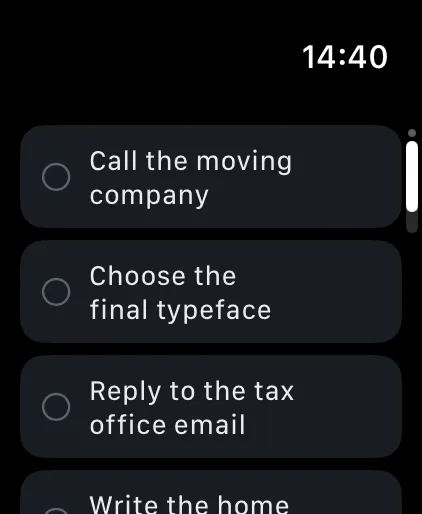
    Today’s tasks on your wrist, and notifications arrive with their actions: complete or postpone a task, tick a routine, without opening the phone. What you tick on the watch lands in the same place the iPhone, iPad and Mac read.

  • Today’s routines at a glance

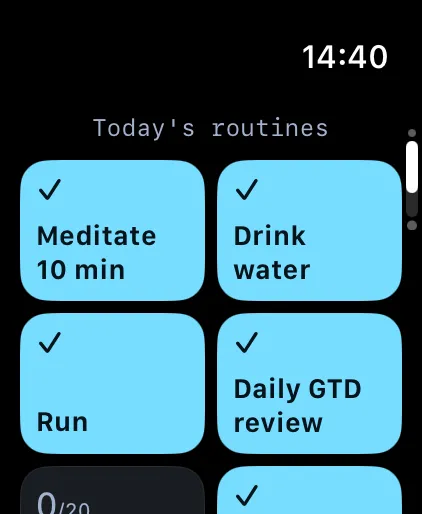
    A mosaic of today’s, done or pending, with colour, glyph and word all at once, so it reads even if you can’t tell the colours apart. Ticking one is a single tap.

  • Focus stays with you

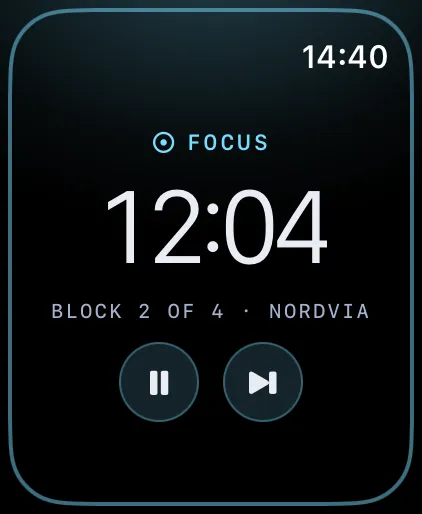
    The phase, the time left and the block you’re on, with pause and skip on the face. Cyan is focus and violet is rest, whatever your accent. And a complication to see it without opening anything.

Olena on Apple Watch: today’s tasks, each with its mark to complete it
Olena on Apple Watch: the mosaic of today’s routines, with the done ones ticked
Olena on Apple Watch: a focus block in progress with the time left and the pause and skip buttons

€4.99 / year

One subscription. All four devices.

  • iPhone
  • iPad
  • Mac
  • Apple Watch

Per year, not per month. No per-device charge and no separate Mac version: what you pay covers all four, the Mac one is native, built for the Mac on purpose, and the watch inherits the entitlement from the iPhone with nothing to buy on your wrist.

Tell me when it ships

The method — GTD, without the sermon

Five steps, and Olena does four of them with you.

GTD (Getting Things Done) is a method for getting things out of your head and into somewhere you can trust. It sounds like a 300-page manual, and it is one. Olena boils it down to what you actually do every day.

  1. Capture

    Everything on your mind goes to the inbox without deciding where it belongs. Type “lunch with Ana tomorrow 2pm @calls” and Olena works out the date, the context and the project. Two seconds — that’s the bar for capturing to become a habit.

  2. Clarify

    One decision comes out of the inbox: is it an action? a project? does it have a context? Olena asks once and then leaves you alone. Anything that isn’t actionable goes out.

  3. Organise

    Projects, areas and contexts, the way the method intends. Plus perspectives: saved views that answer “what can I do right now, here, with the time I’ve got”.

  4. Reflect

    The weekly review is the heart of GTD and where almost everyone abandons it. Olena tells you when seven days have passed and puts it in front of you as five minutes, not an afternoon.

  5. Engage

    This is where the calendar changes the rules: drag a task onto a free slot and it stops being an intention and becomes a commitment with a time. If it doesn’t fit, you find out before you promise it.

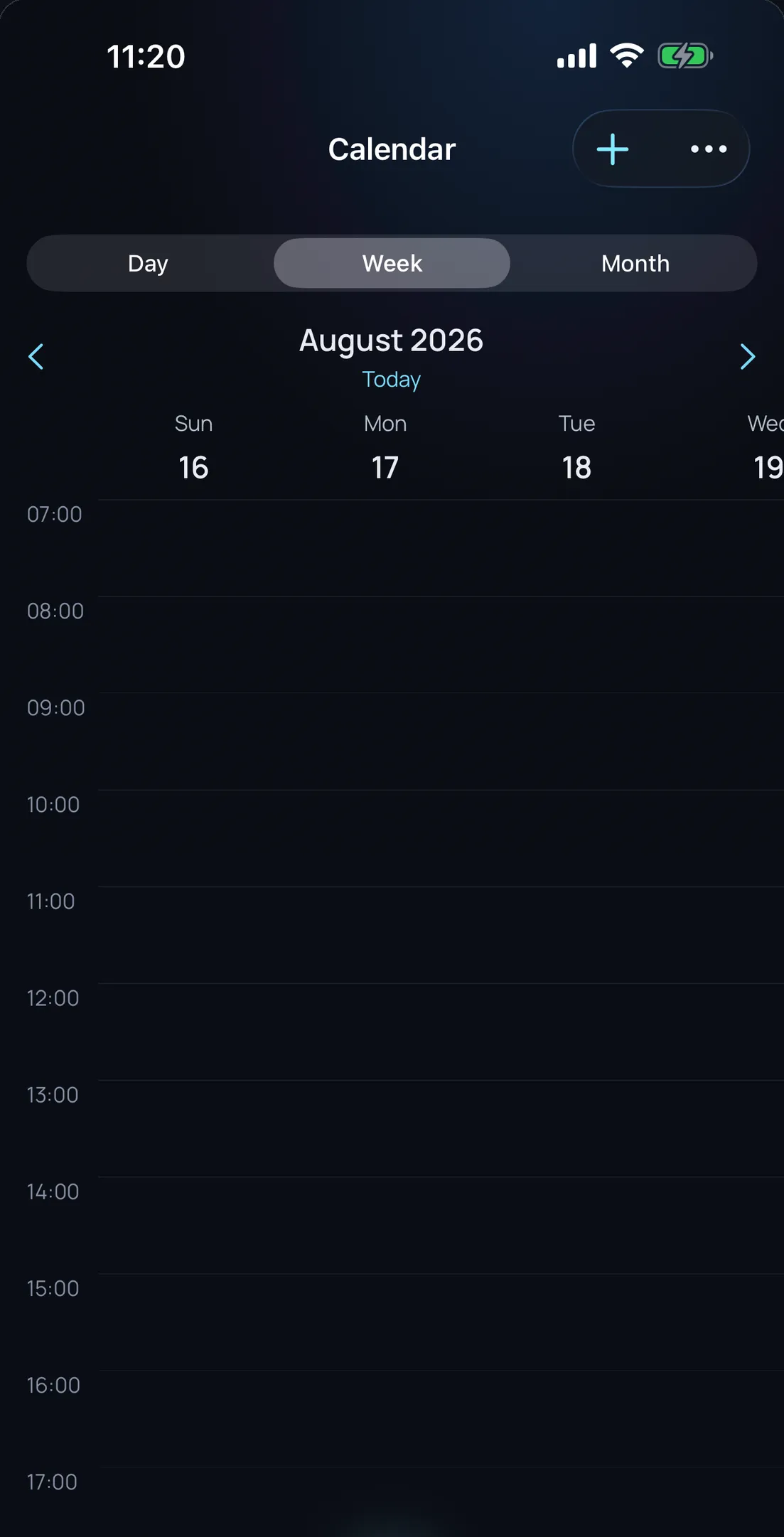
Olena on iPhone: the calendar in week view, showing the real events from the system

You don’t need to know GTD to use Olena. But if you do know it, you’ll recognise all of it.

Concentration

A Pomodoro that doesn’t make you stare at your phone.

The point of the Pomodoro technique is not having to think: you work, it rings, you rest, you return. The moment you have to confirm every block, the method breaks.

  • It chains itself

    When the work block ends the break starts, and from the break into the next block. Without touching anything. If you never look at your phone, the cycle carries on regardless.

  • On the Lock Screen and in the Dynamic Island

    The countdown lives outside the app, as a Live Activity. You can leave the phone face down and still know how long is left at a glance.

  • Your durations

    Work, short break and long break are configurable, and so is how many blocks go by before the long one. Twenty-five minutes is a convention, not a law.

The things that repeat

GTD has no answer for habits. Olena does.

The method covers what happens once. But half of life is what happens every day, which is why almost everyone ends up with a second habit app. Not here.

  • Six ways to measure a habit

    Yes or no, quantity, duration, avoidance — for what you want to stop doing — X times a week, and every N days. Most apps only understand the first one.

  • Streaks you can see

    Current streak, best streak, percentage of the month and a twelve-week heat map. Miss a day and you can log the previous seven: real life doesn’t get recorded on time.

  • Without opening the app

    Its own Home Screen widget, Siri shortcuts and Spotlight access. Ticking a routine takes less than opening the app.

You pick the colour

Four accents, and the one you pick runs the whole app.

It is not a setting buried on the last screen. The accent colours the buttons, the context tags, the calendar’s “Now” line and the streak rings. The whole app, not a detail.

  • Emerald
  • Orange
  • Blue
  • Violet

This page changes colour as you scroll, and that is deliberate: each section is painted in one of the four. What you see here is exactly what you get to choose in there.

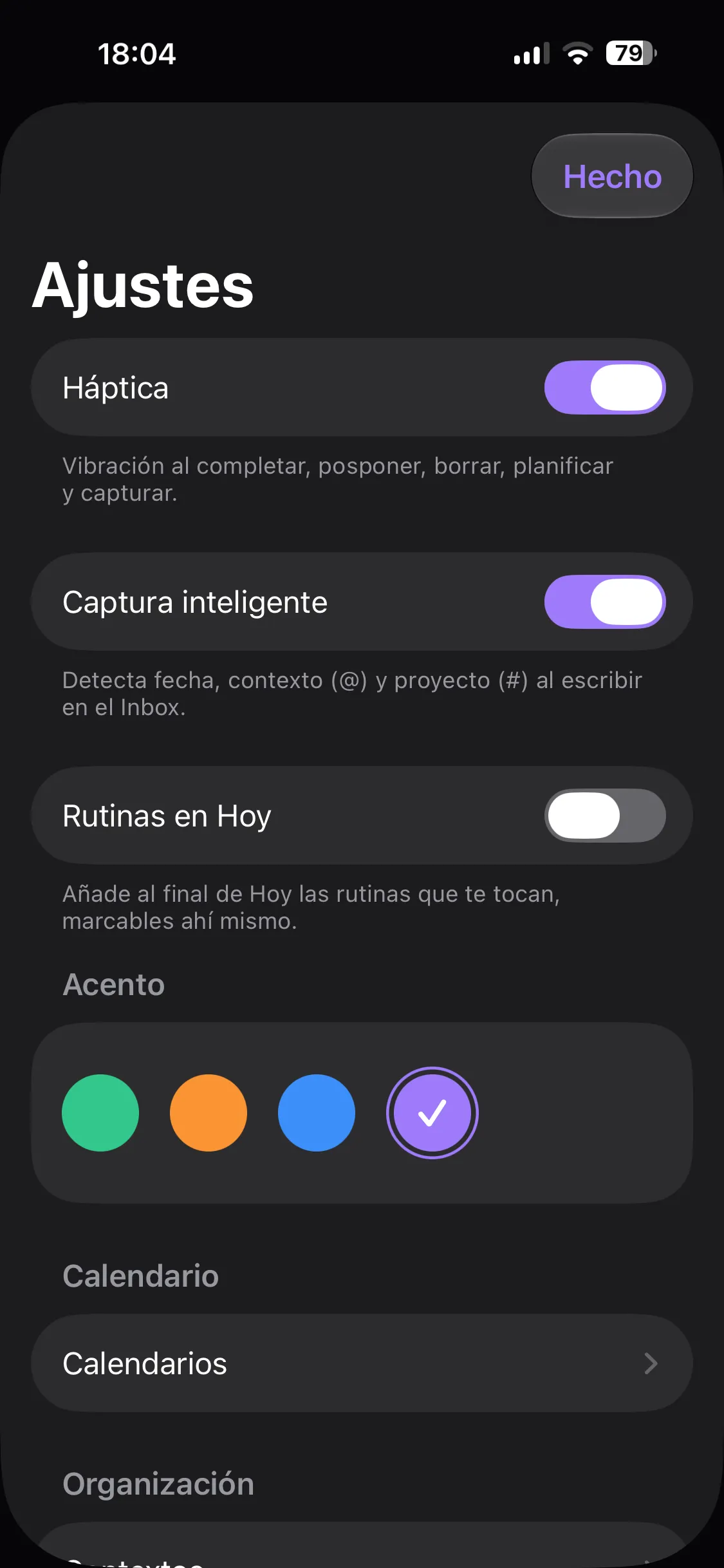
Olena on iPhone: the general settings showing the four available accent colours, with violet selected

Against what you’ve already tried

Where Olena fits

We’re not going to pretend the others are bad: there are excellent apps out there and you’ve probably paid for one. The question is what each of them asks you to give up.

CriterioOlenaThe beautiful one-off purchaseThe powerful GTD oneThe one that plans for you
Real calendar built inSystem events and tasks on one timelineDoesn’t read your calendarBasic reading, no mergeYes, but on their server
Complete GTD methodInbox, projects, areas, contexts, perspectives and reviewPartial, no guided reviewComplete, with a steep learning curveNo methodology at all
Habits and routinesSix types, streaks and a heat mapNoNoNo
Where your data livesOn your device and your private iCloudOn your deviceOn your deviceOn their servers, calendar included
What it costs a year€4.99€45–80 (one-off, per platform)€45–75€100–200

Figures are indicative and correct at the time of writing; third-party prices change. What doesn’t change is where your data ends up.

One clear price. No catches.

Before you pay, you get 1 year to use the whole app, no cut-down tier and no feature you can’t try. Equivalent price in your region.

Other apps in this space run between €45 and €80 a year. We would rather the decision wasn’t a financial one.

Questions you ask us

What happens when the free year ends?

The app becomes read-only: you can still see and search everything, but you cannot create or edit. Nothing is deleted and nothing is locked away. Subscribe later and it all picks up where you left it.

Is Olena a one-time purchase?

No — it’s a subscription: €4.99 a year, with a 1 year free trial of the whole product before you pay anything. We understand the appeal of paying once, but a single payment funds no maintenance: those apps end up abandoned, or charging per major version, which is a subscription with a worse name. At this price, a decade of Olena costs less than many of those “buy it forever” apps.

Do I need to know GTD to use it?

No. You can use Olena as a task list with a good calendar and never notice there’s a method underneath. If one day you want the full system, it’s already there: inbox, clarification, projects, areas, contexts, perspectives and a weekly review.

How does the Pomodoro work?

You choose the work, short break and long break durations, and how many blocks go by before the long one. From there it chains itself: you never confirm a stretch. The countdown shows on the Lock Screen and in the Dynamic Island, so you can leave the phone face down.

How are routines different from tasks?

A task happens once; a routine happens every day. There are six ways to measure them: yes or no, quantity, duration, avoidance, X times a week and every N days. With current streak, best streak, percentage of the month and a twelve-week heat map. You can log up to seven days back, because real life doesn’t get recorded on time.

Where is my data?

On your device, with SwiftData, synced through your own private iCloud container. There is no Olena server. No usage analytics, no advertising identifiers, no third parties.

Does it sync between my iPhone, my iPad and my Mac?

Yes, through your own private iCloud container — the same mechanism Apple uses for Notes or Reminders. It never passes through a server of ours because none exists. Turn iCloud off and Olena keeps working locally. The Mac app is days away; once it ships it syncs the same way as iPhone and iPad.

Which devices does it run on?

iPhone, iPad, Mac and Apple Watch, each handling the part of the method it’s best at: you capture on the iPhone, sort things out on the iPad, do the weekly review on the Mac and act from your wrist — notifications, routines and Pomodoro — each with its own interface, not a resized copy. Widgets and Siri shortcuts are included. The Mac app is days away.

If I stop using it, do I take my data with me?

Yes. From Settings you export everything to a dated .json file, yours, without asking anyone. And you can erase it all — local model, iCloud copy, notifications, Spotlight index and widgets — with a separate checkbox to also delete the calendar events Olena created.

Why is it so cheap?

Because there are no servers to pay for, no sales team and no investment round to pay back. Falkir’s running costs are tiny and the people punch above their weight: you can build something enormous with very little when nobody makes you justify an office. We’re not pocketing that saving — it’s in the price.
Shall we talk?

One email when there’s something worth telling. Not one more — we promise on January’s snow.

Rather write to us directly? contact@falkir.es